Code Execution
Suppose an agent needs to analyze sales data: write a CSV into the sandbox, load and compute it in a stateful kernel, generate a chart, save it, and download it. The file routes carry the dataset and chart, while the analysis runs in the kernel session.
If no state needs to survive between calls, one POST /v2/code/executePOST /v1/code/execute call is enough.
Requirements
GET /v2/sandbox should include code_interpreter in capabilities.
GET /v1/capabilities should report code_interpreter.
The kernel session needs ipykernel in the host Python (code_interpreter.python_kernels is non-empty) plus pandas and matplotlib; the AIO image ships all three.
Analyze a dataset in a kernel session
The kernel keeps df between calls and returns rich output: text/html for a DataFrame, image/png for a figure. Files it writes stay in the sandbox, and the file plane serves them. The example renders with the Agg backend and saves the chart with savefig, so it runs on either Python backend and the chart comes back over the file plane.
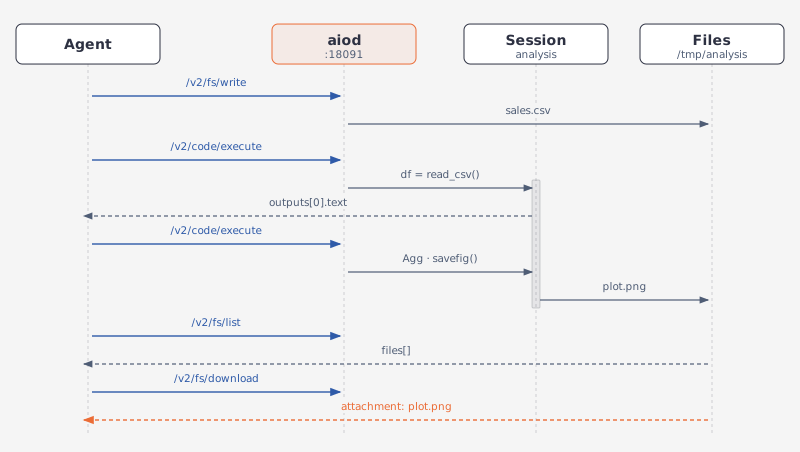
BASE_URL = "http://127.0.0.1:18091"
SESSION = "analysis"
sb = Aio(BASE_URL)

# 1. The dataset, written through the file plane.
sb.post("/v2/fs/write", path="/tmp/analysis/sales.csv", content=(
    "month,revenue,cost\n2026-01,120,80\n2026-02,135,82\n2026-03,150,90\n"
    "2026-04,142,95\n2026-05,168,99\n2026-06,180,104\n"
))

# 2. Name a session, then load and compute in it.
first = sb.post("/v2/code/execute", language="python", session_id=SESSION, code="""
import pandas as pd
df = pd.read_csv("/tmp/analysis/sales.csv")
df["margin"] = df.revenue - df.cost
print(df.margin.describe())
""")
print(first["outputs"][0]["text"])
# -> "count     6.000000\nmean     57.500000\nstd      13.546217\n…"

# 3. Plot in the same session, and save the chart into the sandbox.
sb.post("/v2/code/execute", language="python", session_id=SESSION, code="""
import matplotlib
matplotlib.use("Agg")
import matplotlib.pyplot as plt
df.plot(x="month", y=["revenue", "cost"], kind="bar", figsize=(6, 3))
plt.tight_layout()
plt.savefig("/tmp/analysis/plot.png", dpi=120)
""")

# 4. The chart is a sandbox file now; the agent sees it on the file plane.
files = sb.get("/v2/fs/list", path="/tmp/analysis")["files"]
print([(f["name"], f["size"]) for f in files])

# 5. Download the bytes: attachment; filename="plot.png".
chart = sb.http.get("/v2/fs/download", params={"path": "/tmp/analysis/plot.png"})
print(len(chart.content))
open("margin.png", "wb").write(chart.content)

sb.delete(f"/v2/code/sessions/{SESSION}")
import { writeFileSync } from "node:fs";

const BASE_URL = "http://127.0.0.1:18091";
const SESSION = "analysis";
const sb = new Aio(BASE_URL);

// 1. The dataset, written through the file plane.
await sb.post("/v2/fs/write", {
  path: "/tmp/analysis/sales.csv",
  content:
    "month,revenue,cost\n2026-01,120,80\n2026-02,135,82\n2026-03,150,90\n" +
    "2026-04,142,95\n2026-05,168,99\n2026-06,180,104\n",
});

// 2. Name a session, then load and compute in it.
const first = await sb.post("/v2/code/execute", {
  language: "python",
  session_id: SESSION,
  code: `
import pandas as pd
df = pd.read_csv("/tmp/analysis/sales.csv")
df["margin"] = df.revenue - df.cost
print(df.margin.describe())
`,
});
console.log(first.outputs[0].text);
// -> "count     6.000000\nmean     57.500000\nstd      13.546217\n…"

// 3. Plot in the same session, and save the chart into the sandbox.
await sb.post("/v2/code/execute", {
  language: "python",
  session_id: SESSION,
  code: `
import matplotlib
matplotlib.use("Agg")
import matplotlib.pyplot as plt
df.plot(x="month", y=["revenue", "cost"], kind="bar", figsize=(6, 3))
plt.tight_layout()
plt.savefig("/tmp/analysis/plot.png", dpi=120)
`,
});

// 4. The chart is a sandbox file now; the agent sees it on the file plane.
const listed = await sb.get("/v2/fs/list?path=/tmp/analysis");
console.log(listed.files.map((f: any) => [f.name, f.size]));

// 5. Download the bytes: attachment; filename="plot.png".
const dl = await fetch(`${BASE_URL}/v2/fs/download?path=/tmp/analysis/plot.png`);
const bytes = Buffer.from(await dl.arrayBuffer());
console.log(bytes.length);
writeFileSync("margin.png", bytes);

await sb.delete(`/v2/code/sessions/${SESSION}`);
from agent_sandbox import Sandbox

BASE_URL = "http://127.0.0.1:18091"
# The SDK's default timeout is 60 s; kernel start can be slower, so raise it.
client = Sandbox(base_url=BASE_URL, timeout=120)

# 1. The dataset, written through the file plane.
client.file.write_file(file="/tmp/analysis/sales.csv", content=(
    "month,revenue,cost\n2026-01,120,80\n2026-02,135,82\n2026-03,150,90\n"
    "2026-04,142,95\n2026-05,168,99\n2026-06,180,104\n"
))

# 2. Create a session, then load and compute in it.
session_id = client.jupyter.create_session().data.session_id

first = client.jupyter.execute_code(session_id=session_id, code="""
import pandas as pd
df = pd.read_csv("/tmp/analysis/sales.csv")
df["margin"] = df.revenue - df.cost
print(df.margin.describe())
""").data
print(first.outputs[0].text)
# -> "count     6.000000\nmean     57.500000\nstd      13.546217\n…"

# 3. Plot in the same session, and save the chart into the sandbox.
client.jupyter.execute_code(session_id=session_id, code="""
import matplotlib
matplotlib.use("Agg")
import matplotlib.pyplot as plt
df.plot(x="month", y=["revenue", "cost"], kind="bar", figsize=(6, 3))
plt.tight_layout()
plt.savefig("/tmp/analysis/plot.png", dpi=120)
""")

# 4. The chart is a sandbox file now; the agent sees it on the file plane.
files = client.file.list_path(path="/tmp/analysis").data.files
print([(f.name, f.size) for f in files])

# 5. Download the bytes: attachment; filename="plot.png".
chart = b"".join(client.file.download_file(path="/tmp/analysis/plot.png"))
print(len(chart))
open("margin.png", "wb").write(chart)

client.jupyter.delete_session(session_id=session_id)
import { writeFileSync } from "node:fs";

import { SandboxClient } from "@agent-infra/sandbox";

const BASE_URL = "http://127.0.0.1:18091";
// The SDK's default timeout is 60 s; kernel start can be slower, so raise it.
const client = new SandboxClient({ environment: BASE_URL, timeoutInSeconds: 120 });

// 1. The dataset, written through the file plane.
await client.file.writeFile({
  file: "/tmp/analysis/sales.csv",
  content:
    "month,revenue,cost\n2026-01,120,80\n2026-02,135,82\n2026-03,150,90\n" +
    "2026-04,142,95\n2026-05,168,99\n2026-06,180,104\n",
});

// 2. Create a session, then load and compute in it.
const session = (await client.jupyter.createSession()) as any;
const sessionId = session.body.data.session_id;

const first = (await client.jupyter.executeCode({
  session_id: sessionId,
  code: `
import pandas as pd
df = pd.read_csv("/tmp/analysis/sales.csv")
df["margin"] = df.revenue - df.cost
print(df.margin.describe())
`,
} as any)) as any;
console.log(first.body.data.outputs[0].text);
// -> "count     6.000000\nmean     57.500000\nstd      13.546217\n…"

// 3. Plot in the same session, and save the chart into the sandbox.
await client.jupyter.executeCode({
  session_id: sessionId,
  code: `
import matplotlib
matplotlib.use("Agg")
import matplotlib.pyplot as plt
df.plot(x="month", y=["revenue", "cost"], kind="bar", figsize=(6, 3))
plt.tight_layout()
plt.savefig("/tmp/analysis/plot.png", dpi=120)
`,
} as any);

// 4. The chart is a sandbox file now; the agent sees it on the file plane.
const listed = (await client.file.listPath({ path: "/tmp/analysis" })) as any;
console.log(listed.body.data.files.map((f: any) => [f.name, f.size]));

// 5. Download the bytes: attachment; filename="plot.png".
const dl = (await client.file.downloadFile({ path: "/tmp/analysis/plot.png" })) as any;
const bytes = Buffer.from(await dl.body.arrayBuffer());
console.log(bytes.length);
writeFileSync("margin.png", bytes);

await client.jupyter.deleteSession(sessionId);
outputs is the notebook output list:
An agent loop feeds stream text and error tracebacks back to the model and reuses the session, so the model iterates on the same df. A kernel session is reaped after 300 s idle; the last line of the block above ends it early.
The payloads a model sees
Both shapes below come from the kernel backend. df.head(3) in that session returns one execute_result holding both representations of the table; the full text/html is 819 characters, trimmed here to the shape. A figure drawn after %matplotlib inline is a display_data, and image/png is bare base64 with no data: prefix.
Only the keys an output type uses are present:
{
  "data": {
    "text/html": "<div>\n<style scoped>\n…\n</style>\n<table border=\"1\" class=\"dataframe\">\n  <thead>\n    <tr style=\"text-align: right;\">\n      <th></th>\n      <th>month</th>\n…\n    </tr>\n  </thead>\n  <tbody>\n    <tr>\n      <th>0</th>\n      <td>2026-01</td>\n      <td>120</td>\n      <td>80</td>\n      <td>40</td>\n    </tr>\n…\n  </tbody>\n</table>\n</div>",
    "text/plain": "     month  revenue  cost  margin\n0  2026-01      120    80      40\n1  2026-02      135    82      53\n2  2026-03      150    90      60"
  },
  "execution_count": 2,
  "metadata": {},
  "output_type": "execute_result"
}
{
  "data": {
    "image/png": "iVBORw0KGgoAAAANSUhEUgAAAk4AAAEiCAYAAAAPh11JAAAAOnRFWHRTb2Z0…",
    "text/plain": "<Figure size 600x300 with 1 Axes>"
  },
  "metadata": {},
  "output_type": "display_data"
}
Every output object carries the same nine keys, null where the type does not use them:
{
  "data": {
    "text/html": "<div>\n<style scoped>\n…\n</style>\n<table border=\"1\" class=\"dataframe\">\n  <thead>\n    <tr style=\"text-align: right;\">\n      <th></th>\n      <th>month</th>\n…\n    </tr>\n  </thead>\n  <tbody>\n    <tr>\n      <th>0</th>\n      <td>2026-01</td>\n      <td>120</td>\n      <td>80</td>\n      <td>40</td>\n    </tr>\n…\n  </tbody>\n</table>\n</div>",
    "text/plain": "     month  revenue  cost  margin\n0  2026-01      120    80      40\n1  2026-02      135    82      53\n2  2026-03      150    90      60"
  },
  "ename": null,
  "evalue": null,
  "execution_count": 2,
  "metadata": {},
  "name": null,
  "output_type": "execute_result",
  "text": null,
  "traceback": null
}
{
  "data": {
    "image/png": "iVBORw0KGgoAAAANSUhEUgAAAk4AAAEiCAYAAAAPh11JAAAAOnRFWHRTb2Z0…",
    "text/plain": "<Figure size 600x300 with 1 Axes>"
  },
  "ename": null,
  "evalue": null,
  "execution_count": null,
  "metadata": {},
  "name": null,
  "output_type": "display_data",
  "text": null,
  "traceback": null
}
One-shot execution
A run without a session happens in a process that is discarded afterwards:
BASE_URL = "http://127.0.0.1:18091"
sb = Aio(BASE_URL)

py = sb.post("/v2/code/execute", language="python", code="print(sum([1,2,3]))")
js = sb.post("/v2/code/execute", language="javascript",
             code="console.log([1,2,3].reduce((a,b)=>a+b))")
print(py["stdout"].strip(), js["stdout"].strip())
# -> 6 6
const BASE_URL = "http://127.0.0.1:18091";
const sb = new Aio(BASE_URL);

const py = await sb.post("/v2/code/execute", {
  language: "python",
  code: "print(sum([1,2,3]))",
});
const js = await sb.post("/v2/code/execute", {
  language: "javascript",
  code: "console.log([1,2,3].reduce((a,b)=>a+b))",
});
console.log(py.stdout.trim(), js.stdout.trim());
// -> 6 6
from agent_sandbox import Sandbox

BASE_URL = "http://127.0.0.1:18091"
client = Sandbox(base_url=BASE_URL)

py = client.code.execute_code(language="python", code="print(sum([1,2,3]))").data
js = client.code.execute_code(language="javascript",
                              code="console.log([1,2,3].reduce((a,b)=>a+b))").data
print(py.stdout.strip(), js.stdout.strip())
# -> 6 6
import { SandboxClient } from "@agent-infra/sandbox";

const BASE_URL = "http://127.0.0.1:18091";
const client = new SandboxClient({ environment: BASE_URL });

const py = (await client.code.executeCode({
  language: "python",
  code: "print(sum([1,2,3]))",
} as any)) as any;
const js = (await client.code.executeCode({
  language: "javascript",
  code: "console.log([1,2,3].reduce((a,b)=>a+b))",
} as any)) as any;
console.log(py.body.data.stdout.trim(), js.body.data.stdout.trim());
// -> 6 6
Both forms read data out of the envelope. The whole reply for the Python call is:
{
  "success": true,
  "message": "ok",
  "data": {
    "code": "print(sum([1,2,3]))",
    "language": "python",
    "status": "ok",
    "execution_count": 1,
    "exit_code": 0,
    "outputs": [
      {
        "output_type": "stream",
        "name": "stdout",
        "text": "6\n"
      }
    ],
    "stdout": "6\n",
    "stderr": "",
    "session_id": null
  }
}
{
  "success": true,
  "message": "ok",
  "data": {
    "code": "print(sum([1,2,3]))",
    "language": "python",
    "status": "ok",
    "execution_count": 1,
    "exit_code": 0,
    "outputs": [
      {
        "output_type": "stream",
        "name": "stdout",
        "text": "6\n"
      }
    ],
    "stdout": "6\n",
    "stderr": null,
    "session_id": null
  }
}
Do not judge execution by the HTTP status alone.
A code exception or timeout still returns HTTP 200, but success is false:
An error output contains these key fields:
{
  "output_type": "error",
  "ename": "<exception type>",
  "evalue": "<error message>",
  "traceback": [
    "<stack trace>"
  ]
}
Failure handling depends on the caller:
Rich output and backends
Rich output is available when the Python backend is kernel, even for a run without a session.
Check capabilities.code_interpreter.backend in GET /v2/sandbox to see the active backend:
{
  "capabilities": {
    "code_interpreter": {
      "backend": "kernel"
    }
  }
}
Check code_interpreter.backend in GET /v1/capabilities to see the active backend:
{
  "data": {
    "code_interpreter": {
      "backend": "kernel"
    }
  }
}
Set AIO_CODE_BACKEND=kernel to pin the code routes to the kernel. /v1/jupyter/execute always uses the kernel, regardless of that setting.
Reuse a session
The same session_id on consecutive calls keeps variables alive. The session is created on first use, so nothing has to open it:
BASE_URL = "http://127.0.0.1:18091"
sb = Aio(BASE_URL)

sb.post("/v2/code/execute", language="python", code="x = 21", session_id="s1")
r = sb.post("/v2/code/execute", language="python", code="print(x * 2)",
            session_id="s1")
print(r["stdout"].strip())
# -> 42
const BASE_URL = "http://127.0.0.1:18091";
const sb = new Aio(BASE_URL);

await sb.post("/v2/code/execute", {
  language: "python",
  code: "x = 21",
  session_id: "s1",
});
const r = await sb.post("/v2/code/execute", {
  language: "python",
  code: "print(x * 2)",
  session_id: "s1",
});
console.log(r.stdout.trim());
// -> 42
from agent_sandbox import Sandbox

BASE_URL = "http://127.0.0.1:18091"
client = Sandbox(base_url=BASE_URL)

client.code.execute_code(language="python", code="x = 21", session_id="s1")
r = client.code.execute_code(language="python", code="print(x * 2)",
                             session_id="s1").data
print(r.stdout.strip())
# -> 42
import { SandboxClient } from "@agent-infra/sandbox";

const BASE_URL = "http://127.0.0.1:18091";
const client = new SandboxClient({ environment: BASE_URL });

await client.code.executeCode({
  language: "python",
  code: "x = 21",
  session_id: "s1",
} as any);
const r = (await client.code.executeCode({
  language: "python",
  code: "print(x * 2)",
  session_id: "s1",
} as any)) as any;
console.log(r.body.data.stdout.trim());
// -> 42
A session is reclaimed once it goes idle: after 300 s on the kernel tier, 1800 s on the native REPL. A run may take timeout seconds, 30 by default and 900 at most; the code plane's info route reports those limits next to the backends and the interpreter versions.
Stateful JavaScript
A named session keeps JavaScript globals the same way; a call without one is stateless:
BASE_URL = "http://127.0.0.1:18091"
sb = Aio(BASE_URL)

sb.post("/v2/code/execute", language="javascript", code="globalThis.n = 41",
        session_id="s1")
r = sb.post("/v2/code/execute", language="javascript", code="console.log(n + 1)",
            session_id="s1")
print(r["stdout"].strip())
# -> 42
const BASE_URL = "http://127.0.0.1:18091";
const sb = new Aio(BASE_URL);

await sb.post("/v2/code/execute", {
  language: "javascript",
  code: "globalThis.n = 41",
  session_id: "s1",
});
const r = await sb.post("/v2/code/execute", {
  language: "javascript",
  code: "console.log(n + 1)",
  session_id: "s1",
});
console.log(r.stdout.trim());
// -> 42
from agent_sandbox import Sandbox

BASE_URL = "http://127.0.0.1:18091"
client = Sandbox(base_url=BASE_URL)

client.nodejs.execute_code(code="globalThis.n = 41", session_id="s1")
r = client.nodejs.execute_code(code="console.log(n + 1)", session_id="s1").data
print(r.stdout.strip())
# -> 42
import { SandboxClient } from "@agent-infra/sandbox";

const BASE_URL = "http://127.0.0.1:18091";
const client = new SandboxClient({ environment: BASE_URL });

await client.nodejs.executeCode({ code: "globalThis.n = 41", session_id: "s1" } as any);
const r = (await client.nodejs.executeCode({
  code: "console.log(n + 1)",
  session_id: "s1",
} as any)) as any;
console.log(r.body.data.stdout.trim());
// -> 42
Backend selection
Python on the code routes uses the first available backend:
AIO_JUPYTER_ENDPOINT, when reachable- the embedded kernel, when
ipykernel is installed
- the native Python REPL
JavaScript always runs on the native REPL.
Errors
