
Agent Calls the Sandbox

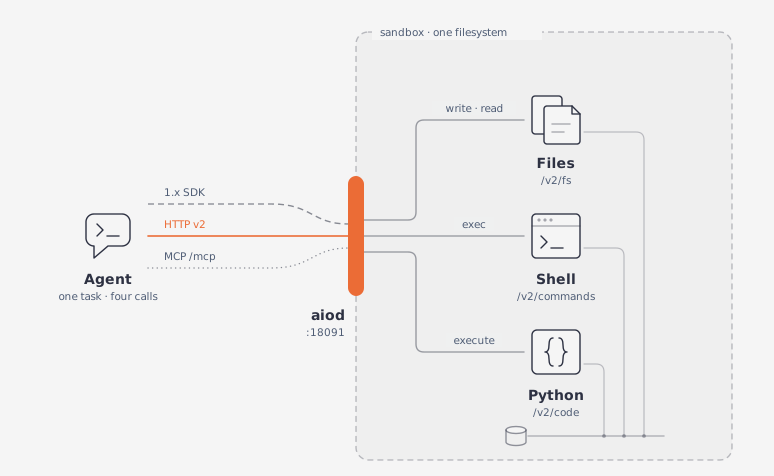
Suppose an agent gets a small task: write data into the sandbox, process it with a command and Python, then read the result back. The whole flow takes four calls on one filesystem.
Requirements

The capabilities object from GET /v2/sandbox should include files, exec, and code_interpreter.

GET /v1/capabilities should report files, exec, and code_interpreter.

With AIO_API_KEY set, send the key as a bearer token.

The loop

Each step is one call. The command and the code read the file written in step 1, because every plane shares the same filesystem:

Every call goes through the shared Aio helper (Conventions), which unwraps the envelope to data.

Python
TypeScript
BASE_URL = "http://127.0.0.1:18091"
sb = Aio(BASE_URL)

def run() -> None:
    # 1. Write the input file.
    sb.post("/v2/fs/write", path="/tmp/agent-data.txt", content="3\n7\n12\n5\n")

    # 2. Run a command on it.
    cmd = sb.post("/v2/commands", command="wc -l /tmp/agent-data.txt")
    print("bash:", cmd["output"].strip(), "exit", cmd["exit_code"])
    # bash: 4 /tmp/agent-data.txt exit 0

    # 3. Execute Python that reads the file and writes a result.
    code = (
        "nums = [int(l) for l in open('/tmp/agent-data.txt').read().split()]\n"
        "open('/tmp/agent-result.txt', 'w').write(str(sum(nums)))\n"
        "print('sum written')"
    )
    ran = sb.post("/v2/code/execute", language="python", code=code)
    print("code:", ran["stdout"].strip(), "status", ran["status"])
    # code: sum written status ok

    # 4. Read the result back.
    result = sb.get("/v2/fs/read", path="/tmp/agent-result.txt")
    print("result:", result["content"])
    # result: 27

if __name__ == "__main__":
    run()

The 1.x SDK covers all four calls; the result sits under data, and under body.data in TypeScript.

Python
TypeScript
from agent_sandbox import Sandbox

BASE_URL = "http://127.0.0.1:18091"
client = Sandbox(base_url=BASE_URL)
# headers={"x-api-key": "<key>"} when AIO_API_KEY is set

def run() -> None:
    # 1. Write the input file.
    client.file.write_file(file="/tmp/agent-data.txt", content="3\n7\n12\n5\n")

    # 2. Run a command on it.
    cmd = client.bash.exec(command="wc -l /tmp/agent-data.txt").data
    print("bash:", cmd.output.strip(), "exit", cmd.exit_code)
    # bash: 4 /tmp/agent-data.txt exit 0

    # 3. Execute Python that reads the file and writes a result.
    code = (
        "nums = [int(l) for l in open('/tmp/agent-data.txt').read().split()]\n"
        "open('/tmp/agent-result.txt', 'w').write(str(sum(nums)))\n"
        "print('sum written')"
    )
    ran = client.code.execute_code(language="python", code=code).data
    print("code:", ran.stdout.strip(), "status", ran.status)
    # code: sum written status ok

    # 4. Read the result back.
    result = client.file.read_file(file="/tmp/agent-result.txt").data
    print("result:", result.content)
    # result: 27

if __name__ == "__main__":
    run()

Both forms print the same three lines and leave the same two files behind. wc -l pads its count, so strip() is what turns 4 /tmp/agent-data.txt into the line above.