Browser Use
This example builds a small page from scratch: the agent writes the page, starts a static server, then uses HTTP to observe it, fill in a name, click a link, read the result, and take a screenshot.
The page is built inside the sandbox by the file and command planes, so the whole flow runs offline and produces the same result every time.
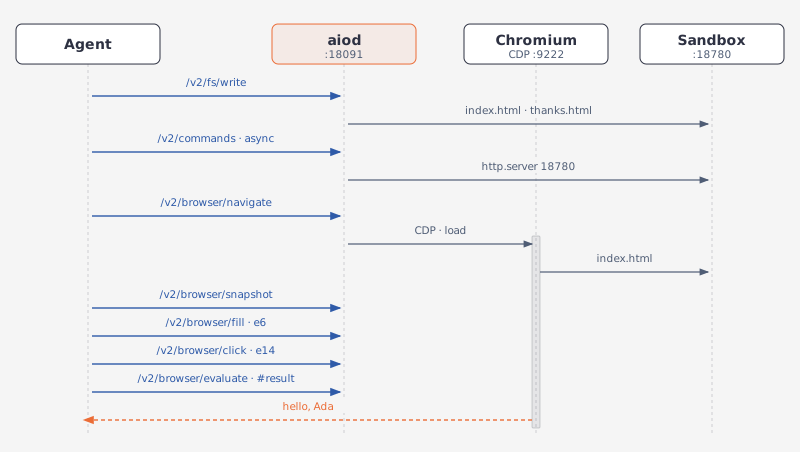
The tools are navigate, snapshot, fill, click, evaluate, and screenshot. Their routes are:
Creating the page also requires one file write and one command run. Both surfaces take the same request bodies.
Requirements
GET /v2/sandbox should report browser.status: "ready" and include files and exec in capabilities.
GET /v1/capabilities should report browser with status: "ready", and files and exec for the fixture.
The browser plane is a CDP client, so a Chromium has to be listening on its debug port — 127.0.0.1:9222 by default. See Browser API.
The page is served by a python3 static server; any static server would do. Pick an unused port; the examples below use 18780.
The blocks continue one script: BASE_URL, the clients built in the first block and the fixture port carry over. Most calls go through sb.post/sb.get, which already unwrap the envelope to data; a call that needs the envelope itself (success, message, a status code) or a binary body drops to sb.http — the client the helper builds — instead.
Build a page to drive
Write two HTML files through the file plane, then start a static server through the command plane. The server starts in the background and returns at once; use the id in the response to manage it later:
import time

BASE_URL = "http://127.0.0.1:18091"
PORT = 18780
DIR = "/tmp/webapp"
sb = Aio(BASE_URL)

INDEX_HTML = """<!doctype html>
<title>Greeter</title>
<input id="name" placeholder="Your name">
<button id="greet">Greet</button>
<p id="result"></p>
<a href="/thanks.html">Thanks</a>
<script>
document.getElementById('greet').onclick = () => {
  const name = document.getElementById('name').value;
  setTimeout(() => {
    document.getElementById('result').textContent = 'hello, ' + name;
  }, 300);
};
</script>
"""

THANKS_HTML = """<!doctype html>
<title>Thanks</title>
<p>Thanks!</p>
<a href="/index.html">Back</a>
"""

for name, html in [("index.html", INDEX_HTML), ("thanks.html", THANKS_HTML)]:
    written = sb.post("/v2/fs/write", path=f"{DIR}/{name}", content=html)
    print(written["file"], written["bytes_written"])
# → /tmp/webapp/index.html 398
# → /tmp/webapp/thanks.html 84

serve = sb.post(
    "/v2/commands",
    command=f"python3 -m http.server {PORT} --bind 127.0.0.1 --directory {DIR}",
    mode="async",
)
command = serve["command_id"]
print(serve["status"], command)
# → running aff4cddb-8933-494d-9baf-1f5b3401cfe1


def port_state() -> str:
    probe = (f"python3 -c \"import socket; print('free' if "
             f"socket.socket().connect_ex(('127.0.0.1', {PORT})) else 'in use')\"")
    out = sb.post("/v2/commands", command=probe)
    return out["output"].strip()


while port_state() == "free":
    time.sleep(0.2)
print(port_state())
# → in use
import { writeFileSync } from "node:fs";

const BASE_URL = "http://127.0.0.1:18091";
const PORT = 18780;
const DIR = "/tmp/webapp";
const sb = new Aio(BASE_URL);

const INDEX_HTML = `<!doctype html>
<title>Greeter</title>
<input id="name" placeholder="Your name">
<button id="greet">Greet</button>
<p id="result"></p>
<a href="/thanks.html">Thanks</a>
<script>
document.getElementById('greet').onclick = () => {
  const name = document.getElementById('name').value;
  setTimeout(() => {
    document.getElementById('result').textContent = 'hello, ' + name;
  }, 300);
};
</script>
`;

const THANKS_HTML = `<!doctype html>
<title>Thanks</title>
<p>Thanks!</p>
<a href="/index.html">Back</a>
`;

for (const [name, html] of [["index.html", INDEX_HTML], ["thanks.html", THANKS_HTML]]) {
  const written = await sb.post("/v2/fs/write", {
    path: `${DIR}/${name}`,
    content: html,
  });
  console.log(written.file, written.bytes_written);
}
// → /tmp/webapp/index.html 398
// → /tmp/webapp/thanks.html 84

const serve = await sb.post("/v2/commands", {
  command: `python3 -m http.server ${PORT} --bind 127.0.0.1 --directory ${DIR}`,
  mode: "async",
});
const command = serve.command_id;
console.log(serve.status, command);
// → running 59fbd023-2b2d-4735-b748-40e1eebf5deb

async function portState(): Promise<string> {
  const probe = `python3 -c "import socket; print('free' if `
    + `socket.socket().connect_ex(('127.0.0.1', ${PORT})) else 'in use')"`;
  const out = await sb.post("/v2/commands", { command: probe });
  return out.output.trim();
}

while ((await portState()) === "free") {
  await new Promise((r) => setTimeout(r, 200));
}
console.log(await portState());
// → in use
import time

from agent_sandbox import Sandbox

BASE_URL = "http://127.0.0.1:18091"
PORT = 18780
DIR = "/tmp/webapp"
client = Sandbox(base_url=BASE_URL)
# The 1.x SDK has no snapshot, fill, or ref click, and no file delete; those
# steps go through the shared helper, with the same bodies the v2 tools take.
sb = Aio(BASE_URL)

INDEX_HTML = """<!doctype html>
<title>Greeter</title>
<input id="name" placeholder="Your name">
<button id="greet">Greet</button>
<p id="result"></p>
<a href="/thanks.html">Thanks</a>
<script>
document.getElementById('greet').onclick = () => {
  const name = document.getElementById('name').value;
  setTimeout(() => {
    document.getElementById('result').textContent = 'hello, ' + name;
  }, 300);
};
</script>
"""

THANKS_HTML = """<!doctype html>
<title>Thanks</title>
<p>Thanks!</p>
<a href="/index.html">Back</a>
"""

for name, html in [("index.html", INDEX_HTML), ("thanks.html", THANKS_HTML)]:
    written = client.file.write_file(file=f"{DIR}/{name}", content=html).data
    print(written.file, written.bytes_written)
# → /tmp/webapp/index.html 398
# → /tmp/webapp/thanks.html 84

serve = client.bash.exec(
    command=f"python3 -m http.server {PORT} --bind 127.0.0.1 --directory {DIR}",
    async_mode=True,
).data
session = serve.session_id
print(serve.status, session)
# → running fb118692-a65c-40f7-a8d1-53b469aab28c


def port_state() -> str:
    probe = (f"python3 -c \"import socket; print('free' if "
             f"socket.socket().connect_ex(('127.0.0.1', {PORT})) else 'in use')\"")
    return client.bash.exec(command=probe).data.output.strip()


while port_state() == "free":
    time.sleep(0.2)
print(port_state())
# → in use
import { writeFileSync } from "node:fs";

import { SandboxClient } from "@agent-infra/sandbox";

const BASE_URL = "http://127.0.0.1:18091";
const PORT = 18780;
const DIR = "/tmp/webapp";
const client = new SandboxClient({ environment: BASE_URL });
// The 1.x SDK has no snapshot, fill, or ref click, and no file delete; those
// steps go through the shared helper, with the same bodies the v2 tools take.
const sb = new Aio(BASE_URL);

const INDEX_HTML = `<!doctype html>
<title>Greeter</title>
<input id="name" placeholder="Your name">
<button id="greet">Greet</button>
<p id="result"></p>
<a href="/thanks.html">Thanks</a>
<script>
document.getElementById('greet').onclick = () => {
  const name = document.getElementById('name').value;
  setTimeout(() => {
    document.getElementById('result').textContent = 'hello, ' + name;
  }, 300);
};
</script>
`;

const THANKS_HTML = `<!doctype html>
<title>Thanks</title>
<p>Thanks!</p>
<a href="/index.html">Back</a>
`;

for (const [name, html] of [["index.html", INDEX_HTML], ["thanks.html", THANKS_HTML]]) {
  const w = (await client.file.writeFile({
    file: `${DIR}/${name}`,
    content: html,
  })) as any;
  console.log(w.body.data.file, w.body.data.bytes_written);
}
// → /tmp/webapp/index.html 398
// → /tmp/webapp/thanks.html 84

const serve = (await client.bash.exec({
  command: `python3 -m http.server ${PORT} --bind 127.0.0.1 --directory ${DIR}`,
  async_mode: true,
} as any)) as any;
const session = serve.body.data.session_id;
console.log(serve.body.data.status, session);
// → running 310aff1c-46df-48b8-8ea6-83f33e7ae15c

async function portState(): Promise<string> {
  const probe = `python3 -c "import socket; print('free' if `
    + `socket.socket().connect_ex(('127.0.0.1', ${PORT})) else 'in use')"`;
  const out = (await client.bash.exec({ command: probe })) as any;
  return out.body.data.output.trim();
}

while ((await portState()) === "free") {
  await new Promise((r) => setTimeout(r, 200));
}
console.log(await portState());
// → in use
The command plane writes nothing the file plane cannot see: both work on one filesystem, so the server serves the files written a moment earlier.
Waiting for the port matters. A background command answers before its process has bound anything, and a navigation that arrives too early lands on Chromium's error page instead of the fixture. The same helper proves the port is free again at the end.
Navigate and look
navigate returns when wait_until fires, load by default — its envelope also carries message: "Navigated", which sb.post already peels away in favor of data. evaluate runs one expression in the page. snapshot returns the accessibility tree, which is what the agent reads instead of pixels or coordinates:
nav = sb.post("/v2/browser/navigate", url=f"http://127.0.0.1:{PORT}/index.html")
print(nav["url"])
# → http://127.0.0.1:18780/index.html

title = sb.post("/v2/browser/evaluate", expression="document.title")["value"]
print(title)
# → Greeter

snapshot = sb.post("/v2/browser/snapshot", interactive_only=True)
const nav = await sb.post("/v2/browser/navigate", {
  url: `http://127.0.0.1:${PORT}/index.html`,
});
console.log(nav.url);
// → http://127.0.0.1:18780/index.html

const { value: title } = await sb.post("/v2/browser/evaluate", {
  expression: "document.title",
});
console.log(title);
// → Greeter

const snapshot = await sb.post("/v2/browser/snapshot", { interactive_only: true });
nav = sb.post("/v1/browser/navigate", url=f"http://127.0.0.1:{PORT}/index.html")
print(nav["url"])
# → http://127.0.0.1:18780/index.html

title = sb.post("/v1/browser/evaluate", expression="document.title")["value"]
print(title)
# → Greeter

snapshot = sb.post("/v1/browser/snapshot", interactive_only=True)
const nav = await sb.post("/v1/browser/navigate", {
  url: `http://127.0.0.1:${PORT}/index.html`,
});
console.log(nav.url);
// → http://127.0.0.1:18780/index.html

const { value: title } = await sb.post("/v1/browser/evaluate", {
  expression: "document.title",
});
console.log(title);
// → Greeter

const snapshot = await sb.post("/v1/browser/snapshot", { interactive_only: true });
interactive_only: true prunes the tree to the nodes that can be acted on, which for this page is three:
{
  "role": "RootWebArea",
  "children": [
    {
      "role": "group",
      "children": [
        {
          "role": "textbox",
          "name": "Your name",
          "ref": "e6"
        },
        {
          "role": "button",
          "name": "Greet",
          "ref": "e14"
        },
        {
          "role": "link",
          "name": "Thanks",
          "ref": "e16"
        }
      ]
    }
  ]
}
A node carries role, name, ref, and children. The ref is Chromium's backend node id for that element, and it is what click, fill, and upload address. Ref values change from one page load to the next, so read them out of the snapshot rather than writing them into the script.
Fill, click, and wait for the result
Two helpers make the loop: one finds a ref by role and name, one polls the page until it says what the agent is waiting for.
def find_ref(node: dict, role: str, name: str) -> str:
    if node.get("role") == role and node.get("name") == name:
        return node["ref"]
    for child in node.get("children", []):
        found = find_ref(child, role, name)
        if found:
            return found
    return ""


box = find_ref(snapshot, "textbox", "Your name")
button = find_ref(snapshot, "button", "Greet")

sb.post("/v2/browser/fill", ref=box, value="Ada")
sb.post("/v2/browser/click", ref=button)


def wait_for_text(selector: str, tries: int = 20) -> str:
    expr = f"document.querySelector({selector!r}).textContent"
    for _ in range(tries):
        value = sb.post("/v2/browser/evaluate", expression=expr)["value"]
        if value:
            return value
        time.sleep(0.25)
    raise TimeoutError(f"{selector} stayed empty")


print(wait_for_text("#result"))
# → hello, Ada
function findRef(node: any, role: string, name: string): string {
  if (node.role === role && node.name === name) return node.ref;
  for (const child of node.children ?? []) {
    const found = findRef(child, role, name);
    if (found) return found;
  }
  return "";
}

const box = findRef(snapshot, "textbox", "Your name");
const button = findRef(snapshot, "button", "Greet");

await sb.post("/v2/browser/fill", { ref: box, value: "Ada" });
await sb.post("/v2/browser/click", { ref: button });

async function waitForText(selector: string, tries = 20): Promise<string> {
  const expr = `document.querySelector(${JSON.stringify(selector)}).textContent`;
  for (let i = 0; i < tries; i++) {
    const { value } = await sb.post("/v2/browser/evaluate", { expression: expr });
    if (value) return value;
    await new Promise((r) => setTimeout(r, 250));
  }
  throw new Error(`${selector} stayed empty`);
}

console.log(await waitForText("#result"));
// → hello, Ada
def find_ref(node: dict, role: str, name: str) -> str:
    if node.get("role") == role and node.get("name") == name:
        return node["ref"]
    for child in node.get("children", []):
        found = find_ref(child, role, name)
        if found:
            return found
    return ""


box = find_ref(snapshot, "textbox", "Your name")
button = find_ref(snapshot, "button", "Greet")

sb.post("/v1/browser/fill", ref=box, value="Ada")
sb.post("/v1/browser/click", ref=button)


def wait_for_text(selector: str, tries: int = 20) -> str:
    expr = f"document.querySelector({selector!r}).textContent"
    for _ in range(tries):
        value = sb.post("/v1/browser/evaluate", expression=expr)["value"]
        if value:
            return value
        time.sleep(0.25)
    raise TimeoutError(f"{selector} stayed empty")


print(wait_for_text("#result"))
# → hello, Ada
function findRef(node: any, role: string, name: string): string {
  if (node.role === role && node.name === name) return node.ref;
  for (const child of node.children ?? []) {
    const found = findRef(child, role, name);
    if (found) return found;
  }
  return "";
}

const box = findRef(snapshot, "textbox", "Your name");
const button = findRef(snapshot, "button", "Greet");

await sb.post("/v1/browser/fill", { ref: box, value: "Ada" });
await sb.post("/v1/browser/click", { ref: button });

async function waitForText(selector: string, tries = 20): Promise<string> {
  const expr = `document.querySelector(${JSON.stringify(selector)}).textContent`;
  for (let i = 0; i < tries; i++) {
    const { value } = await sb.post("/v1/browser/evaluate", { expression: expr });
    if (value) return value;
    await new Promise((r) => setTimeout(r, 250));
  }
  throw new Error(`${selector} stayed empty`);
}

console.log(await waitForText("#result"));
// → hello, Ada
fill sets the value through the element's native property setter and then fires input and change, so a framework-controlled input sees a real change and not just a rewritten DOM attribute. click by ref is a real mouse press and release at the element's box centre, which is why the page's own handler runs. Both answer with message: "Filled" / "Clicked" on success — sb.post already drops that, so the proof that lands here is wait_for_text finding the DOM actually changed.
Both run on the daemon's built-in CDP backend. Pointing AIO_AGENT_BROWSER_BIN at an agent-browser CLI delegates the whole ref suite — snapshot, click, fill, and upload — to that binary instead, and its replies then carry hint: "backend=agent-browser".
wait_for_text is the shape every wait takes here: there is no wait route, so the agent polls evaluate until the page says what it is waiting for, with a bounded number of tries. The button in this fixture answers after 300 ms, so the first poll comes back empty.
Screenshot
The screenshot route answers with the image itself, not with JSON:
shot = sb.http.get("/v2/browser/screenshot", params={"format": "jpeg", "quality": 80})
with open("greeter.jpg", "wb") as out:
    out.write(shot.content)
print(len(shot.content))
# → 7382
const shot = await fetch(`${BASE_URL}/v2/browser/screenshot?format=jpeg&quality=80`);
const bytes = Buffer.from(await shot.arrayBuffer());
writeFileSync("greeter.jpg", bytes);
console.log(bytes.length);
// → 7382
shot = b"".join(client.browser.screenshot())
with open("greeter.png", "wb") as out:
    out.write(shot)
const shot = (await client.browser.screenshot({ format: "jpeg", quality: 80 })) as any;
const bytes = Buffer.from(await shot.body.arrayBuffer());
writeFileSync("greeter.jpg", bytes);
console.log(bytes.length);
// → 7382
The reply is a 200 with content-type: image/jpeg. format is png by default, quality applies to jpeg, and full_page=true captures the whole scrollable page instead of the viewport. A PNG reply also carries x-image-width and x-image-height. The bytes go to the caller; nothing is written inside the sandbox. For files the sandbox itself produced, use the file plane's download route — see File Operations.
When a step fails
Two failures are worth meeting once, because neither looks like an error at the HTTP layer. Both turn on the envelope's success and message — and the second on the status code too — so both calls drop to sb.http instead of sb.post:
dead = sb.http.post("/v2/browser/navigate",
                    json={"url": f"http://127.0.0.1:{PORT + 1}/"}).json()
print(dead["success"], dead["message"])
# → True Navigated
where = sb.post("/v2/browser/evaluate", expression="location.href")["value"]
print(where)
# → chrome-error://chromewebdata/

sb.post("/v2/browser/navigate", url=f"http://127.0.0.1:{PORT}/thanks.html")
stale = sb.http.post("/v2/browser/fill", json={"ref": box, "value": "Ada"})
print(stale.status_code, stale.json()["message"])
# → 503 browser: DOM.resolveNode: No node with given id found
const dead = await fetch(`${BASE_URL}/v2/browser/navigate`, {
  method: "POST",
  headers: { "Content-Type": "application/json" },
  body: JSON.stringify({ url: `http://127.0.0.1:${PORT + 1}/` }),
}).then((r) => r.json());
console.log(dead.success, dead.message);
// → true Navigated
const { value: where } = await sb.post("/v2/browser/evaluate", {
  expression: "location.href",
});
console.log(where);
// → chrome-error://chromewebdata/

await sb.post("/v2/browser/navigate", { url: `http://127.0.0.1:${PORT}/thanks.html` });
const stale = await fetch(`${BASE_URL}/v2/browser/fill`, {
  method: "POST",
  headers: { "Content-Type": "application/json" },
  body: JSON.stringify({ ref: box, value: "Ada" }),
});
const staleBody = await stale.json();
console.log(stale.status, staleBody.message);
// → 503 browser: DOM.resolveNode: No node with given id found
dead = sb.http.post("/v1/browser/navigate",
                    json={"url": f"http://127.0.0.1:{PORT + 1}/"}).json()
print(dead["success"], dead["message"])
# → True Navigated
where = sb.post("/v1/browser/evaluate", expression="location.href")["value"]
print(where)
# → chrome-error://chromewebdata/

sb.post("/v1/browser/navigate", url=f"http://127.0.0.1:{PORT}/thanks.html")
stale = sb.http.post("/v1/browser/fill", json={"ref": box, "value": "Ada"})
print(stale.status_code, stale.json()["message"])
# → 503 browser: DOM.resolveNode: No node with given id found
const dead = await fetch(`${BASE_URL}/v1/browser/navigate`, {
  method: "POST",
  headers: { "Content-Type": "application/json" },
  body: JSON.stringify({ url: `http://127.0.0.1:${PORT + 1}/` }),
}).then((r) => r.json());
console.log(dead.success, dead.message);
// → true Navigated
const { value: where } = await sb.post("/v1/browser/evaluate", {
  expression: "location.href",
});
console.log(where);
// → chrome-error://chromewebdata/

await sb.post("/v1/browser/navigate", { url: `http://127.0.0.1:${PORT}/thanks.html` });
const stale = await fetch(`${BASE_URL}/v1/browser/fill`, {
  method: "POST",
  headers: { "Content-Type": "application/json" },
  body: JSON.stringify({ ref: box, value: "Ada" }),
});
const staleBody = await stale.json();
console.log(stale.status, staleBody.message);
// → 503 browser: DOM.resolveNode: No node with given id found
A refused connection is still a navigation: Chromium loads its own error page, that page fires load, and navigate reports success. The check that matters is what the page turned out to be, not the status code. A host that never answers is the other case — navigate then answers 503 with browser: in front of the message, once the lifecycle wait or the CDP call underneath it runs out.
A ref belongs to the document it was snapshotted from. After a navigation the same ref either no longer resolves, as above, or resolves to whatever node now carries that id — the same call answered 200 Filled on another run, having filled something else. Take a fresh snapshot after every navigation rather than treating the error as the signal.
Errors on the shape of a call are ordinary: no selector and no ref is a 400, a ref that is not e<number> is a 400, and a selector matching nothing is a 404.
Clean up when done
The fixture server outlives the script unless it is stopped. One call signals the process, one removes the directory, and the port probe from the first block confirms the port came back. Both replies are read for message, so both drop to sb.http:
killed = sb.http.post(f"/v2/commands/{command}/kill", json={}).json()
removed = sb.http.post("/v2/fs/delete", json={"path": DIR, "recursive": True}).json()
print(killed["message"], "|", removed["message"], "|", port_state())
# → Operation successful | Directory deleted successfully | free
const killed = await fetch(`${BASE_URL}/v2/commands/${command}/kill`, {
  method: "POST",
  headers: { "Content-Type": "application/json" },
  body: "{}",
}).then((r) => r.json());
const removed = await fetch(`${BASE_URL}/v2/fs/delete`, {
  method: "POST",
  headers: { "Content-Type": "application/json" },
  body: JSON.stringify({ path: DIR, recursive: true }),
}).then((r) => r.json());
console.log(killed.message, "|", removed.message, "|", await portState());
// → Operation successful | Directory deleted successfully | free
killed = client.bash.kill(session_id=session)
removed = sb.http.post("/v1/file/delete", json={"path": DIR, "recursive": True}).json()
print(killed.message, "|", removed["message"], "|", port_state())
# → Signal SIGTERM sent | Directory deleted successfully | free
const killed = (await client.bash.kill({ session_id: session })) as any;
const removed = await fetch(`${BASE_URL}/v1/file/delete`, {
  method: "POST",
  headers: { "Content-Type": "application/json" },
  body: JSON.stringify({ path: DIR, recursive: true }),
}).then((r) => r.json());
console.log(killed.body.message, "|", removed.message, "|", await portState());
// → Signal SIGTERM sent | Directory deleted successfully | free
kill sends SIGTERM by default; signal takes another name. Leaving the process running is a real cost in a long-lived sandbox, and so is the port it holds.
You can also inspect and clean up sessions. A run without a session id opens one of its own, so the polling loop above leaves a trail of them.
GET /v2/commands/sessions: lists sessions.DELETE /v2/commands/sessions/{id}: ends a session.
GET /v1/bash/sessions: lists sessions.POST /v1/bash/sessions/{id}/close: ends a session.
