
Jupyter
/v1/jupyter runs Python in a real IPython kernel. It covers what the native Python REPL cannot, at the cost of a heavier process:
- Rich output (
display_datamime bundles, such as matplotlib PNGs) - IPython magics
- A choice of installed Python versions
aiod implements this itself: it spawns ipykernel and speaks the Jupyter kernel protocol to it directly. No Jupyter server is involved, and nothing else needs to run.

What it needs
The Python interpreter aiod selects must import ipykernel (pip install ipykernel). The daemon probes this once and keeps the result for its lifetime, so install ipykernel before starting the daemon. After installation, GET /v1/capabilities reports code_interpreter.jupyter_backend: "kernel" and lists python_kernels.
Without it, the /v1/jupyter/* routes are unavailable and explain how to fix the issue; /v1/code/info also does not advertise a jupyter kind.
If AIO_JUPYTER_ENDPOINT is set and reachable, the external Jupyter server takes precedence over the embedded kernel, and the daemon proxies /v1/jupyter to it as is.
Run a cell
Post the cell source and read the notebook outputs from the response:
Request body:
data is:
code— the code that ranstatus—ok,error, ortimeoutexecution_count— the kernel's cell counteroutputs— notebook output objects (stream,execute_result,display_data,error)session_id— the session that ran it;nullfor a one-offkernel_name— the kernel that ran itmsg_id— the Jupyter message id of the request
Every key is present on every output object, null where it does not apply, so a client can read outputs[i].text or outputs[i].data without branching on the type first.
The body takes these fields:
A kernel_name this daemon does not support is a 422: unknown kernel 'ir'; available: python3, python3.14. A cwd that is not a directory is not a rejection — the cell returns 200 with success: false and a DirectoryError output naming the path.
Kernel info
available_kernels is probed, not declared: every name in it is one a request may pass as kernel_name. The reply also carries a description and a kernel_detection line for a human reading the raw JSON.
What comes back
An output object is one of four shapes:
Matplotlib needs %matplotlib inline for the PNG: with a plain Agg backend the figure goes to a file and the cell returns no display_data.
image/png is base64, about 27 KB for that plot. A file the cell writes instead is an ordinary file: read it back through the file plane.
One-off or session
Without session_id or stateful: true, the cell is a one-off. It runs on a kernel taken from the warm pool, or spawned for the request; that kernel is terminated afterwards, so a name defined by one one-off is a NameError in the next.
Send stateful: true to receive a generated session id, or name your own session_id: either way the next call carrying that id continues in the same namespace. A session owns one kernel for its whole life, and execution_count keeps counting across its calls.
There is no session interrupt or restart: a cell past its timeout is interrupted on its own, and DELETE is how a session ends. Those two paths answer 501 saying so.
The session table is keyed by kernel and id together, so s1 on the default kernel and s1 on another are two namespaces; the second is listed under the composite key python3.14:s1. Where this kernel also serves the Code route, the same id there reaches the session's namespace.
A kernel's working directory is fixed when it starts. A request whose cwd differs from every pooled kernel's starts a new kernel; pooled kernels are never moved.
Timeouts and limits
When a cell exceeds its timeout, the daemon sends interrupt_request on the control channel. It waits 2 s, then terminates the kernel. A kernel that stops in time keeps its session, and the cell reports status: "timeout" — a KeyboardInterrupt output, then execution timed out after 2000ms and was interrupted.
A kernel that ignores the interrupt is terminated and its session is dropped.
Output is capped at 2,000,000 characters per cell. A stream that crosses the cap keeps its head, a stderr stream carrying [output truncated at 2000000 characters] follows, and the cell's later outputs still arrive, within a further 64 KiB. Only stream text can be cut that way: a single result or image over the cap is dropped whole, leaving the note by itself.
A sixth request answers 429 with Maximum number of kernel sessions (5) reached. Existing sessions are never evicted.
A kernel holds about 60 MB of memory. These limits are tighter than the native REPL's 20 sessions and 1800 s.
With a warm pool, the first cell after boot answers in about 90 ms instead of 1.4 s. The pool fills at boot and refills in the background after each use.
Memory usage
Same limits (0.5 CPU, 0.5 GiB) for aiod and the 1.x image: aiod runs nginx and one warm kernel, the 1.x image has Jupyter on and browser/VNC off.
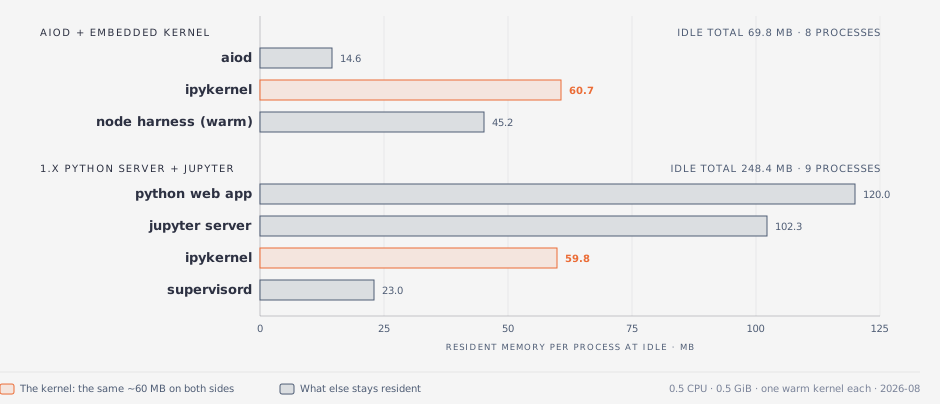
The kernel itself is similar in size; the difference is the surrounding services. Idle, aiod uses 69.8 MB and the 1.x image 248.4 MB.