Interactive Terminal
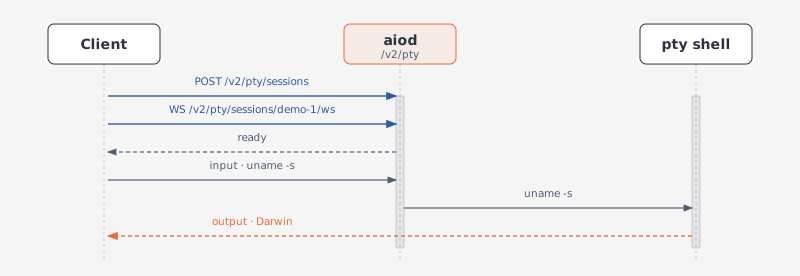
This example follows a command that needs ongoing interaction: create a terminal session, attach to its PTY, run a command, send input, then reattach after the socket drops.
Requirements
GET /v2/sandbox should report an available capabilities.exec.pty.
GET /v1/capabilities should report exec with pty.
Create a session, then attach
A socket attaches to a session that already exists; opening one without naming a session gets a shell that is reclaimed on idle. Create the session first to keep it — durable and restore also need an explicit id and answer 400 without one:
BASE_URL = "http://127.0.0.1:18091"
WS_BASE_URL = "ws://127.0.0.1:18091"
sb = Aio(BASE_URL)

session_id = sb.post("/v2/pty/sessions", id="demo-1")["session_id"]
WS_URL = f"{WS_BASE_URL}/v2/pty/sessions/{session_id}/ws"
print(session_id)
# demo-1
const BASE_URL = "http://127.0.0.1:18091";
const WS_BASE_URL = "ws://127.0.0.1:18091";
const sb = new Aio(BASE_URL);

const { session_id } = await sb.post<any>("/v2/pty/sessions", { id: "demo-1" });
const WS_URL = `${WS_BASE_URL}/v2/pty/sessions/${session_id}/ws`;
console.log(session_id);
// demo-1
The id is yours to choose, so a caller that already has a name for the work can address the terminal by it.
from agent_sandbox import Sandbox

BASE_URL = "http://127.0.0.1:18091"
WS_BASE_URL = "ws://127.0.0.1:18091"
client = Sandbox(base_url=BASE_URL)

session_id = client.shell.create_session().data.session_id
WS_URL = f"{WS_BASE_URL}/v1/shell/ws?session_id={session_id}"
print(session_id)
# 3c2a99fd-c16c-408b-9298-5126e1d00def
import { SandboxClient } from "@agent-infra/sandbox";

const BASE_URL = "http://127.0.0.1:18091";
const WS_BASE_URL = "ws://127.0.0.1:18091";
const client = new SandboxClient({ environment: BASE_URL });

const { session_id } = ((await client.shell.createSession()) as any).body.data;
const WS_URL = `${WS_BASE_URL}/v1/shell/ws?session_id=${session_id}`;
console.log(session_id);
// 3c2a99fd-c16c-408b-9298-5126e1d00def
The daemon mints the id; there is no way to ask for one.
A command does not need a socket connection.
POST /v2/pty/sessions/{id}/exec {command} runs the command in the same terminal.
POST /v1/shell/exec {command, id} runs the command in the same terminal.
The response includes:
session_id, command, status, output, console, exit_code
REST and WebSocket share one shell, so a file created through REST is visible to ls in the attached terminal.
Attach a client
Both routes speak the same messages, so one client covers either — it sends a command, prints what comes back, and runs until you stop it:
import asyncio, json, websockets

async def main():
    # Append &api_key=<key> to WS_URL when AIO_API_KEY is set.
    async with websockets.connect(WS_URL) as ws:
        await ws.send(json.dumps({"type": "input", "data": "uname -s\n"}))
        async for raw in ws:
            msg = json.loads(raw)
            if msg["type"] in ("output", "restore_output"):
                print(msg["data"], end="", flush=True)

asyncio.run(main())
# ~ $ uname -s
# Darwin
# ~ $
import WebSocket from "ws";

// Append &api_key=<key> to WS_URL when AIO_API_KEY is set.
const ws = new WebSocket(WS_URL);

ws.on("open", () => ws.send(JSON.stringify({ type: "input", data: "uname -s\n" })));
ws.on("message", (raw) => {
  const msg = JSON.parse(raw.toString());
  if (msg.type === "output" || msg.type === "restore_output") {
    process.stdout.write(msg.data);
  }
});
setInterval(
  () => ws.send(JSON.stringify({ type: "ping", timestamp: Date.now() })),
  30_000,
);
// ~ $ uname -s
// Darwin
// ~ $
Messages
{"type":"ready","session_id":"…","transport":"json","backend":"tmux","resumed":false}
{"type":"input","data":"ls\n"}
{"type":"resize","cols":120,"rows":40}
{"type":"ping","timestamp":<t>}
{"type":"output","data":"…"}
{"type":"restore_output","data":"…"}
{"type":"pong","timestamp":<t>}
{"type":"error","data":"…"}
Include \n in input to run a line. Non-JSON text is treated as raw input. cols and rows may also sit under data.
protocol=binary switches the data frames only: a binary frame is raw PTY bytes in either direction, and a text frame is still a JSON control message — ready, resize, ping, pong.
A connection without a session
A socket opened without a session id gets one anyway, and the two routes differ in what they say about it:
GET /v2/pty/ws opens a shell that lives exactly as long as the socket. It is not addressable afterwards, so nothing announces an id — ready carries one only because every ready does, and the paint of the empty screen follows straight after:
{"backend":"native","resumed":false,"session_id":"afc14051-206a-4640-82c7-c46119cbaa3b","transport":"json","type":"ready"}
{"data":"\u001b[H\u001b[2J~ $ ","type":"output"}
GET /v1/shell/ws without session_id mints a session that outlives the socket and is reclaimed on idle, so the id is worth having: it arrives in a session_id frame ahead of ready, before the paint of the empty screen:
{"data":"a0bcaea7-16fe-4439-8c9f-45516c81a32e","type":"session_id"}
{"backend":"native","resumed":false,"session_id":"a0bcaea7-16fe-4439-8c9f-45516c81a32e","transport":"json","type":"ready"}
{"data":"\u001b[H\u001b[2J~ $ ","type":"output"}
Backend and limits
AIO_SHELL_BACKEND=auto (default) uses tmux when present, otherwise a native PTY. Sessions survive a daemon restart only under tmux. native pins the native PTY.
cd and environment changes persist for the life of a session.
A session created with an id stays until it is deleted:
DELETE /v2/pty/sessions/{id}: deletes the session.
DELETE /v1/shell/sessions/{session_id}: deletes the session.
Survive a disconnect
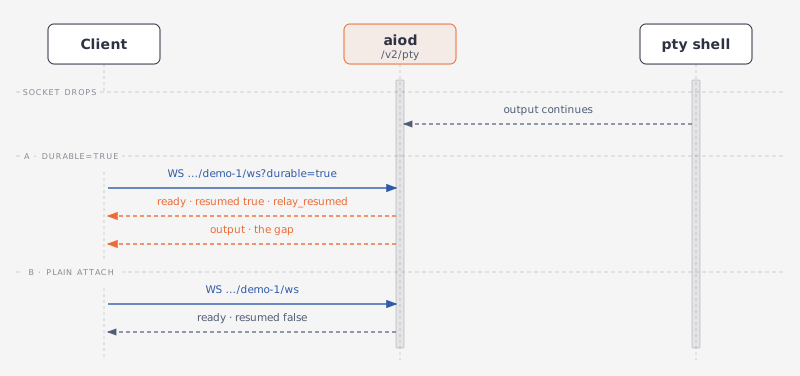
durable=true keeps the terminal alive while no client holds it and lets the next socket take it over. A WebSocket dropped by a network flap, a proxy timeout, or a client restart no longer kills the command; the reconnect replays the output missed in between, so a TUI such as vim or htop keeps rendering correctly.
Start something slow, drop the socket, reconnect:
import asyncio, json, websockets

url = f"{WS_BASE_URL}/v2/pty/sessions/{session_id}/ws?durable=true"

async def main():
    first = await websockets.connect(url)
    await first.send(json.dumps({
        "type": "input",
        "data": "for i in 1 2 3 4 5; do echo tick $i; sleep 1; done\n"}))

    # Two ticks in, the client drops. The loop keeps running.
    await asyncio.sleep(2.5)
    await first.close()
    await asyncio.sleep(3.5)

    async with websockets.connect(url) as second:
        for _ in range(3):
            print(await second.recv())

asyncio.run(main())
sb.delete(f"/v2/pty/sessions/{session_id}")
import WebSocket from "ws";

const url = `${WS_BASE_URL}/v2/pty/sessions/${session_id}/ws?durable=true`;
const wait = (ms: number) => new Promise((r) => setTimeout(r, ms));

const first = new WebSocket(url);
first.on("open", () =>
  first.send(
    JSON.stringify({
      type: "input",
      data: "for i in 1 2 3 4 5; do echo tick $i; sleep 1; done\n",
    }),
  ),
);

// Two ticks in, the client drops. The loop keeps running.
await wait(2500);
first.terminate();
await wait(3500);

let seen = 0;
const second = new WebSocket(url);
second.on("message", (raw) => {
  console.log(raw.toString());
  if (++seen === 3) second.close();
});
await wait(2000);
await sb.delete(`/v2/pty/sessions/${session_id}`);
import asyncio, json, websockets

url = f"{WS_BASE_URL}/v1/shell/ws?session_id={session_id}&durable=true"

async def main():
    first = await websockets.connect(url)
    await first.send(json.dumps({
        "type": "input",
        "data": "for i in 1 2 3 4 5; do echo tick $i; sleep 1; done\n"}))

    # Two ticks in, the client drops. The loop keeps running.
    await asyncio.sleep(2.5)
    await first.close()
    await asyncio.sleep(3.5)

    async with websockets.connect(url) as second:
        for _ in range(4):
            print(await second.recv())

asyncio.run(main())
client.shell.cleanup_session(session_id)
import WebSocket from "ws";

const url = `${WS_BASE_URL}/v1/shell/ws?session_id=${session_id}&durable=true`;
const wait = (ms: number) => new Promise((r) => setTimeout(r, ms));

const first = new WebSocket(url);
first.on("open", () =>
  first.send(
    JSON.stringify({
      type: "input",
      data: "for i in 1 2 3 4 5; do echo tick $i; sleep 1; done\n",
    }),
  ),
);

// Two ticks in, the client drops. The loop keeps running.
await wait(2500);
first.terminate();
await wait(3500);

let seen = 0;
const second = new WebSocket(url);
second.on("message", (raw) => {
  console.log(raw.toString());
  if (++seen === 4) second.close();
});
await wait(2000);
await client.shell.cleanupSession(session_id);
The reattach ends with one frame more than the reconnect produced: attaching to an id the caller already had makes the daemon nudge the foreground job to repaint, so a full-screen program draws itself again instead of leaving the renderer with a fragment. At a bare prompt the nudge shows up as the reprinted prompt line above.
The second socket gets resumed: true and a relay_resumed frame, then only the output produced while nothing was attached. restore=true asks for a bounded snapshot of the whole buffer instead, sized by replay_bytes — 10 MiB by default, clamped to 256 KiB…10 MiB. Retained output lives in the daemon's memory. Only the tmux backend keeps the shell process across a daemon restart.
