
Architecture
aiod is AIO Sandbox's core daemon process. It serves the sandbox tools API and hosts the MCP endpoint.
The shell, interpreters, browser, and desktop it drives are separate processes. aiod discovers them at runtime but does not start them.
The daemon process
It serves commands, files, terminals (PTY), code execution, and browser control over HTTP and WebSocket, and hosts POST /mcp.

The browser is the Chromium process listening for CDP at BROWSER_REMOTE_DEBUGGING_HOST:PORT (default 127.0.0.1:9222); any process may start it.
The desktop is provided by the computer-use worker at AIO_COMPUTER_USE_URL (default http://127.0.0.1:18100). aiod only forwards /v2/computer/* to it and never touches a display itself. The worker is separate because it needs a desktop session.
On Windows the difference is explicit: aiod can run as a Session 0 service, but computer-use must run in the interactive logon session (see Windows).
Dependencies and capabilities
aiod always starts. At boot and on each capability check, it probes the dependencies and reports the result in capabilities:
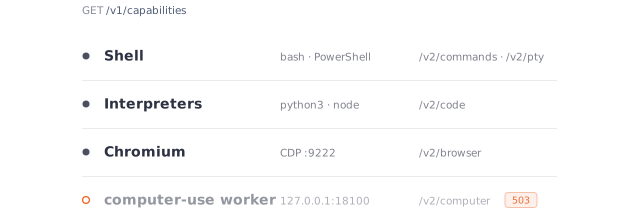
A missing dependency makes only its own routes answer 503; nothing else changes, and the daemon still binds.
GET /v1/capabilities reports the current capability state. The result is cached for 5 s and refreshed in the background; ?refresh=true forces a probe. aiod doctor --json runs the same probes from the command line. The response shape is in Sandbox Info & Capabilities.
State lives in memory
Command sessions, PTY sessions, code sessions, retained output, file watchers, and editor undo history live in process memory. Nothing is written to disk.
A restart or upgrade drops all of this state, so clients must start over. Files already on disk are untouched.
Permission model
Two identities take part, and neither is a sandbox:
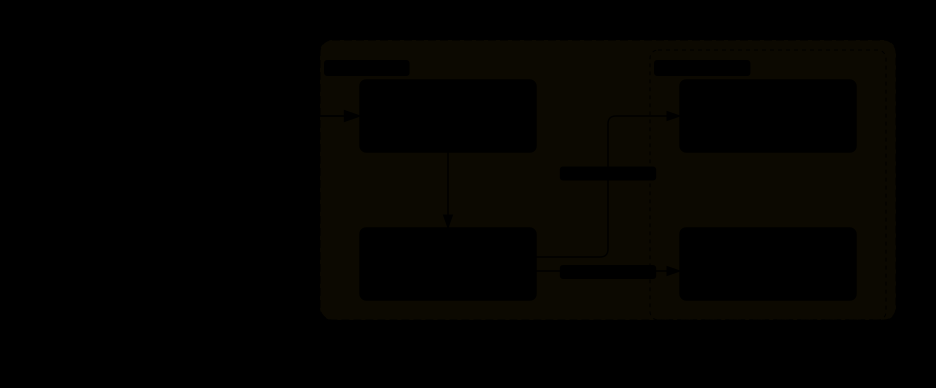
A call can reach anything on the host that the daemon account can reach. aiod provides no per-request jail, chroot, or path allowlist; confining a deployment to a directory or tenant is the sandbox's job.
On Windows user is not implemented, and an explicit value answers 400.
Access to the API is one gate: AIO_API_KEY, checked on every non-public route (see Authentication).
Running the daemon
Add the binary to an image by copying one file:
aiod start takes no required flags. It binds 0.0.0.0:18091, uses the daemon account's home directory as its working directory, and resolves a runtime directory on its own.
Run it as the container's command or under an existing supervisor such as systemd, s6, or a custom init.
A fuller start line, for an image with an unprivileged account and an API key:
--default-user sets the default account for requests, unless a request names another. --api-surface v2 serves only /v2/* and /mcp.
aiod -h lists the subcommands: start, doctor, version, and print-openapi. aiod start --help lists every flag, its variable, and its default.
aiod doctor probes the host without starting the daemon: bash, rg, tmux on PATH, a browser process, and its CDP port. It prints one line per probe.
Two checks matter for orchestration:
Gate restarts on /health. Gate browser, code, and desktop routing on the matching section of /v1/capabilities.
On Kubernetes, one container usually runs aiod, with computer-use added where a desktop exists. A pod that also runs Chromium must allow the seccomp profile Chromium requires (unconfined if nothing stricter is available) and provide a sufficiently large /dev/shm; 4 GiB is a safe default. This is a Chromium requirement, not an extra requirement from aiod.
aiod version prints aio-daemon <version>+<commit>. aiod print-openapi writes the full spec to stdout.
The daemon serves /openapi.json, /v1/openapi.json, and /v2/openapi.json, without a documentation UI. The v2 reference is the API Reference.
Platforms
aiod ships as a static binary for Linux (x86_64, arm64, riscv64) and Windows (x86_64). It needs no shared libraries and no installed runtime.