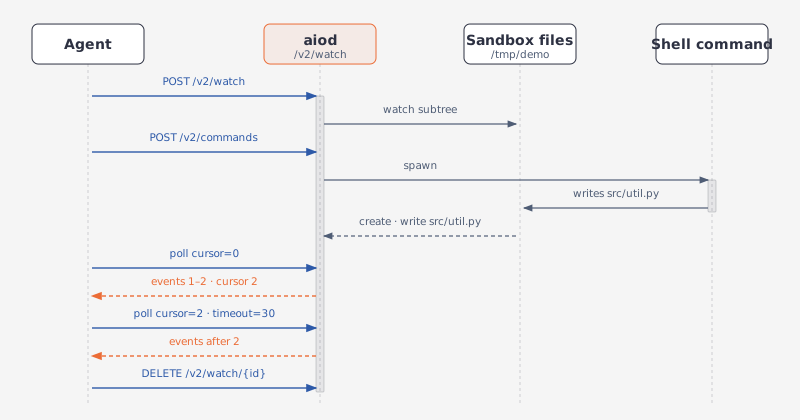
This example follows a common development task: scaffold a small project, find and fix a TODO, read the changed lines, then watch the directory while a command changes it and handle the error contract.
GET /v2/sandbox should include files in capabilities.
GET /v1/capabilities should report files.
The file plane shares one filesystem with commands, terminals, and code execution; confinement is the sandbox's job, not the API's.
Most /v2/fs/* routes also take an optional ?user= — the account attributed as the operation's owner, not an execution identity; the operation still runs with daemon privileges. The byte-stream routes (download, tree as a GET) and /v2/watch have no such parameter.
Make a directory, write two files into it, list what landed, find the TODO by name and then by content, replace it, and read the changed lines back:
The shared Aio helper (Conventions) posts to a route and unwraps the envelope:
Python
TypeScript
BASE_URL = "http://127.0.0.1:18091"sb = Aio(BASE_URL)# 1. Scaffold: one directory, two filessb.post("/v2/fs/mkdir", path="/tmp/demo/src", parents=True)sb.post("/v2/fs/write", path="/tmp/demo/src/app.py", content=( "import sys\n\n" "def main():\n" " # TODO: read the input path from argv\n" " print('hello')\n\n" "if __name__ == '__main__':\n" " main()\n"))sb.post("/v2/fs/write", path="/tmp/demo/README.md", content="# demo\n")listed = sb.get("/v2/fs/list", path="/tmp/demo", recursive=True)print([f["path"] for f in listed["files"]])# 2. Locate the TODO: name glob, then content grepfound = sb.get("/v2/fs/search", path="/tmp/demo", pattern="**/*.py")target = found["files"][0]hit = sb.post("/v2/fs/grep", path=target, pattern="TODO.*")for m in hit["matches"]: print(m["line_number"], m["line_content"])# 4 # TODO: read the input path from argv# 3. Edit with the editor tool; old_str matches literallysb.post("/v2/fs/edit", command="str_replace", path=target, old_str=" # TODO: read the input path from argv\n print('hello')", new_str=" path = sys.argv[1]\n print(open(path).read())")# 4. Read back the changed lines: 0-based, end exclusiveresult = sb.get("/v2/fs/read", path=target, start_line=2, end_line=5)print(result["content"])# def main():# path = sys.argv[1]# print(open(path).read())
const BASE_URL = "http://127.0.0.1:18091";const sb = new Aio(BASE_URL);// 1. Scaffold: one directory, two filesawait sb.post("/v2/fs/mkdir", { path: "/tmp/demo/src", parents: true });await sb.post("/v2/fs/write", { path: "/tmp/demo/src/app.py", content: "import sys\n\n" + "def main():\n" + " # TODO: read the input path from argv\n" + " print('hello')\n\n" + "if __name__ == '__main__':\n" + " main()\n",});await sb.post("/v2/fs/write", { path: "/tmp/demo/README.md", content: "# demo\n" });const listed = await sb.get<any>( `/v2/fs/list?path=${encodeURIComponent("/tmp/demo")}&recursive=true`);console.log(listed.files.map((f: any) => f.path));// 2. Locate the TODO: name glob, then content grepconst found = await sb.get<any>( `/v2/fs/search?path=${encodeURIComponent("/tmp/demo")}` + `&pattern=${encodeURIComponent("**/*.py")}`);const target = found.files[0];const hit = await sb.post<any>("/v2/fs/grep", { path: target, pattern: "TODO.*" });for (const m of hit.matches) console.log(m.line_number, m.line_content);// 4 # TODO: read the input path from argv// 3. Edit with the editor tool; old_str matches literallyawait sb.post("/v2/fs/edit", { command: "str_replace", path: target, old_str: " # TODO: read the input path from argv\n print('hello')", new_str: " path = sys.argv[1]\n print(open(path).read())",});// 4. Read back the changed lines: 0-based, end exclusiveconst read = await sb.get<any>( `/v2/fs/read?path=${encodeURIComponent(target)}&start_line=2&end_line=5`);console.log(read.content);// def main():// path = sys.argv[1]// print(open(path).read())
The 1.x SDK covers every step but the directory, so the shared Aio helper (Conventions) posts that one route:
Python
TypeScript
from agent_sandbox import SandboxBASE_URL = "http://127.0.0.1:18091"client = Sandbox(base_url=BASE_URL)sb = Aio(BASE_URL)# 1. Scaffold: one directory, two files# The 1.x SDK has no mkdir, so the helper posts the route itself.sb.post("/v1/file/mkdir", path="/tmp/demo/src", parents=True)client.file.write_file(file="/tmp/demo/src/app.py", content=( "import sys\n\n" "def main():\n" " # TODO: read the input path from argv\n" " print('hello')\n\n" "if __name__ == '__main__':\n" " main()\n"))client.file.write_file(file="/tmp/demo/README.md", content="# demo\n")listed = client.file.list_path(path="/tmp/demo", recursive=True).dataprint([f.path for f in listed.files])# 2. Locate the TODO: name glob, then content grepfound = client.file.glob_files(path="/tmp/demo", pattern="**/*.py").datatarget = found.files[0].pathhit = client.file.grep_files(path=target, pattern="TODO.*").datafor m in hit.matches: print(m.line_number, m.line_content)# 4 # TODO: read the input path from argv# 3. Edit with the editor tool; old_str matches literallyclient.file.str_replace_editor( command="str_replace", path=target, old_str=" # TODO: read the input path from argv\n print('hello')", new_str=" path = sys.argv[1]\n print(open(path).read())")# 4. Read back the changed lines: 0-based, end exclusiveresult = client.file.read_file(file=target, start_line=2, end_line=5).dataprint(result.content)# def main():# path = sys.argv[1]# print(open(path).read())
import { SandboxClient } from "@agent-infra/sandbox";const BASE_URL = "http://127.0.0.1:18091";const client = new SandboxClient({ environment: BASE_URL });const sb = new Aio(BASE_URL);// 1. Scaffold: one directory, two files// The 1.x SDK has no mkdir, so the helper posts the route itself.await sb.post("/v1/file/mkdir", { path: "/tmp/demo/src", parents: true });await client.file.writeFile({ file: "/tmp/demo/src/app.py", content: "import sys\n\n" + "def main():\n" + " # TODO: read the input path from argv\n" + " print('hello')\n\n" + "if __name__ == '__main__':\n" + " main()\n",});await client.file.writeFile({ file: "/tmp/demo/README.md", content: "# demo\n" });const listed = ((await client.file.listPath({ path: "/tmp/demo", recursive: true,})) as any).body.data;console.log(listed.files.map((f: any) => f.path));// 2. Locate the TODO: name glob, then content grepconst found = ((await client.file.globFiles({ path: "/tmp/demo", pattern: "**/*.py",})) as any).body.data;const target = found.files[0].path;const hit = ((await client.file.grepFiles({ path: target, pattern: "TODO.*",})) as any).body.data;for (const m of hit.matches) console.log(m.line_number, m.line_content);// 4 # TODO: read the input path from argv// 3. Edit with the editor tool; old_str matches literallyawait client.file.strReplaceEditor({ command: "str_replace", path: target, old_str: " # TODO: read the input path from argv\n print('hello')", new_str: " path = sys.argv[1]\n print(open(path).read())",});// 4. Read back the changed lines: 0-based, end exclusiveconst read = ((await client.file.readFile({ file: target, start_line: 2, end_line: 5,})) as any).body.data;console.log(read.content);// def main():// path = sys.argv[1]// print(open(path).read())
In v1, the editor tool exposes only the commands that do not already have another route: str_replace, insert, undo_edit.
view answers 400; use GET /v2/fs/read instead.
create answers 400; use POST /v2/fs/write instead.
view and create still work here.
A str_replace whose old_str is absent answers 400 old_str not found in file. output is the cat -n snippet the tool shows a model; old_content and new_content carry the full file before and after.
The name glob and the content grep are two different routes.
GET /v2/fs/search: v1's glob and find collapsed into one; returns a flat list of paths.
POST /v2/fs/grep: matches content under path, reports 1-based line_number per match, and takes optional context_before/context_after.
POST /v1/file/glob: returns an entry per match with path and its metadata.
POST /v1/file/grep: matches content under path, reports 1-based line_number per match, and takes optional context_before/context_after.
POST /v1/file/search: the older file-scoped, 0-based variant.
An upload never writes the target directly: it fills a .aiod-upload-<id>.part file next to it, then renames that over the target. A write stages the same way through .aiod-write-<id>.part when an ownership identity applies, as it does on the images; without one it writes the target in place and keeps its inode. Two watchers on the same directory, one of them filtering the staging file:
plain = client.file.watch_create(path="/tmp/demo", recursive=True)plain = plain["data"]["watcher_id"]filtered = client.file.watch_create(path="/tmp/demo", recursive=True, exclude=["*.part"])["data"]["watcher_id"]client.file.upload_file(file=("data.csv", b"a,b\n1,2\n"), path="/tmp/demo/data.csv")for name, w in (("plain", plain), ("filtered", filtered)): print(name) for e in poll(w, timeout=2)["events"]: print(" ", e["seq"], e["type"], e["relative_path"])client.file.watch_stop(plain)client.file.watch_stop(filtered)# plain# 1 create .aiod-upload-da85dbba-34b4-45cb-8364-0a72009b9cb3.part# 2 rename .aiod-upload-da85dbba-34b4-45cb-8364-0a72009b9cb3.part# 3 write .aiod-upload-da85dbba-34b4-45cb-8364-0a72009b9cb3.part# 4 rename data.csv# filtered# 1 rename data.csv
const plain = ((await client.file.watchCreate({ path: "/tmp/demo", recursive: true,})) as any).body.data.watcher_id;const filtered = ((await client.file.watchCreate({ path: "/tmp/demo", recursive: true, exclude: ["*.part"],})) as any).body.data.watcher_id;await client.file.uploadFile({ file: new File(["a,b\n1,2\n"], "data.csv"), path: "/tmp/demo/data.csv",} as any);for (const [name, w] of [["plain", plain], ["filtered", filtered]]) { console.log(name); for (const e of (await poll(w, { timeout: 2 })).events) { console.log(" ", e.seq, e.type, e.relative_path); }}await client.file.watchStop(plain);await client.file.watchStop(filtered);// plain// 1 create .aiod-upload-da85dbba-34b4-45cb-8364-0a72009b9cb3.part// 2 rename .aiod-upload-da85dbba-34b4-45cb-8364-0a72009b9cb3.part// 3 write .aiod-upload-da85dbba-34b4-45cb-8364-0a72009b9cb3.part// 4 rename data.csv// filtered// 1 rename data.csv
exclude globs match single path components below the watched root, so *.part hides the staging file and keeps the rename onto the target. The list you pass replaces the default excludes rather than extending them.
The events route pushes the same events as SSE. Every file_change carries the poll payload and an id of <watcher_id>:<seq>, so an EventSource reconnect resumes from Last-Event-ID instead of replaying from the start:
A filesystem failure keeps the envelope: success: false, the message, and a structured data naming the errno, the error kind, the operation, the path, and whether a retry could help.
The helper raises on success: false, so reading a failing reply means going through sb.http instead of sb.get/sb.post:
{ "success": false, "message": "Failed to read file: No such file or directory (os error 2)", "data": { "errno": 2, "errno_name": "ENOENT", "error_type": "not_found", "exception_type": "FileNotFoundError", "message": "Failed to read file: No such file or directory (os error 2)", "operation": "read", "path": "/tmp/demo/missing.txt", "retryable": false }, "hint": null}
The HTTP status carries the kind too:
Status
error_type
400
bad_request, invalid_path, invalid_target
403
permission_denied
404
not_found
409
already_exists
422
decode_error
507
no_space_left
A malformed JSON body answers 422 with a top-level errors list. A malformed query string (a required parameter missing or the wrong type) answers 400 as plain text, not the envelope.
The HTTP status stays 200 whatever the failure was, so success and data.error_type are the only things that name it. A malformed JSON body is the exception: it answers 422 with a top-level errors list before any handler runs.