
#代码执行
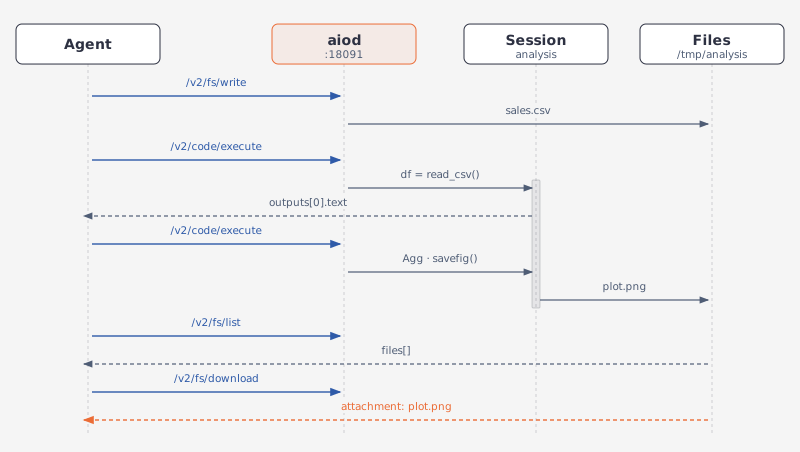
假设 agent 要分析一份销售数据:先把 CSV 写入沙箱,在有状态 kernel 中加载并计算,再生成图表,保存后下载。
数据集和图表通过文件 API 传递,分析过程在 kernel 会话中执行。
如果不需要保留状态,只调用一次 POST /v2/code/executePOST /v1/code/execute 即可。
#要求
GET /v2/sandbox 的 capabilities 中应包含 code_interpreter。
GET /v1/capabilities 的返回结果中应包含 code_interpreter。
kernel 会话要求主机 Python 安装 ipykernel,并安装 pandas 和 matplotlib。可以通过 code_interpreter.python_kernels 检查 kernel 是否可用;AIO 镜像已内置这三个包。
#在 kernel 会话中分析数据集
kernel 在多次调用之间保留 df,并返回富输出:DataFrame 为 text/html,图表为 image/png。它写下的文件留在沙箱里,由文件 API 提供。示例用 Agg 后端绘图并以 savefig 保存,因此在两种 Python 后端上都能运行,图表通过文件 API 取回。
BASE_URL = "http://127.0.0.1:18091"
SESSION = "analysis"
sb = Aio(BASE_URL)

# 1. The dataset, written through the file plane.
sb.post("/v2/fs/write", path="/tmp/analysis/sales.csv", content=(
    "month,revenue,cost\n2026-01,120,80\n2026-02,135,82\n2026-03,150,90\n"
    "2026-04,142,95\n2026-05,168,99\n2026-06,180,104\n"
))

# 2. Name a session, then load and compute in it.
first = sb.post("/v2/code/execute", language="python", session_id=SESSION, code="""
import pandas as pd
df = pd.read_csv("/tmp/analysis/sales.csv")
df["margin"] = df.revenue - df.cost
print(df.margin.describe())
""")
print(first["outputs"][0]["text"])
# -> "count     6.000000\nmean     57.500000\nstd      13.546217\n…"

# 3. Plot in the same session, and save the chart into the sandbox.
sb.post("/v2/code/execute", language="python", session_id=SESSION, code="""
import matplotlib
matplotlib.use("Agg")
import matplotlib.pyplot as plt
df.plot(x="month", y=["revenue", "cost"], kind="bar", figsize=(6, 3))
plt.tight_layout()
plt.savefig("/tmp/analysis/plot.png", dpi=120)
""")

# 4. The chart is a sandbox file now; the agent sees it on the file plane.
files = sb.get("/v2/fs/list", path="/tmp/analysis")["files"]
print([(f["name"], f["size"]) for f in files])

# 5. Download the bytes: attachment; filename="plot.png".
chart = sb.http.get("/v2/fs/download", params={"path": "/tmp/analysis/plot.png"})
print(len(chart.content))
open("margin.png", "wb").write(chart.content)

sb.delete(f"/v2/code/sessions/{SESSION}")
import { writeFileSync } from "node:fs";
const BASE_URL = "http://127.0.0.1:18091";
const SESSION = "analysis";
const sb = new Aio(BASE_URL);
// 1. The dataset, written through the file plane.
await sb.post("/v2/fs/write", {
path: "/tmp/analysis/sales.csv",
content:
"month,revenue,cost\n2026-01,120,80\n2026-02,135,82\n2026-03,150,90\n" +
"2026-04,142,95\n2026-05,168,99\n2026-06,180,104\n",
});
// 2. Name a session, then load and compute in it.
const first = await sb.post("/v2/code/execute", {
language: "python",
session_id: SESSION,
code: `
import pandas as pd
df = pd.read_csv("/tmp/analysis/sales.csv")
df["margin"] = df.revenue - df.cost
print(df.margin.describe())
`,
});
console.log(first.outputs[0].text);
// -> "count 6.000000\nmean 57.500000\nstd 13.546217\n…"
// 3. Plot in the same session, and save the chart into the sandbox.
await sb.post("/v2/code/execute", {
language: "python",
session_id: SESSION,
code: `
import matplotlib
matplotlib.use("Agg")
import matplotlib.pyplot as plt
df.plot(x="month", y=["revenue", "cost"], kind="bar", figsize=(6, 3))
plt.tight_layout()
plt.savefig("/tmp/analysis/plot.png", dpi=120)
`,
});
// 4. The chart is a sandbox file now; the agent sees it on the file plane.
const listed = await sb.get("/v2/fs/list?path=/tmp/analysis");
console.log(listed.files.map((f: any) => [f.name, f.size]));
// 5. Download the bytes: attachment; filename="plot.png".
const dl = await fetch(`${BASE_URL}/v2/fs/download?path=/tmp/analysis/plot.png`);
const bytes = Buffer.from(await dl.arrayBuffer());
console.log(bytes.length);
writeFileSync("margin.png", bytes);
await sb.delete(`/v2/code/sessions/${SESSION}`);from agent_sandbox import Sandbox
BASE_URL = "http://127.0.0.1:18091"
# The SDK's default timeout is 60 s; kernel start can be slower, so raise it.
client = Sandbox(base_url=BASE_URL, timeout=120)
# 1. The dataset, written through the file plane.
client.file.write_file(file="/tmp/analysis/sales.csv", content=(
"month,revenue,cost\n2026-01,120,80\n2026-02,135,82\n2026-03,150,90\n"
"2026-04,142,95\n2026-05,168,99\n2026-06,180,104\n"
))
# 2. Create a session, then load and compute in it.
session_id = client.jupyter.create_session().data.session_id
first = client.jupyter.execute_code(session_id=session_id, code="""
import pandas as pd
df = pd.read_csv("/tmp/analysis/sales.csv")
df["margin"] = df.revenue - df.cost
print(df.margin.describe())
""").data
print(first.outputs[0].text)
# -> "count 6.000000\nmean 57.500000\nstd 13.546217\n…"
# 3. Plot in the same session, and save the chart into the sandbox.
client.jupyter.execute_code(session_id=session_id, code="""
import matplotlib
matplotlib.use("Agg")
import matplotlib.pyplot as plt
df.plot(x="month", y=["revenue", "cost"], kind="bar", figsize=(6, 3))
plt.tight_layout()
plt.savefig("/tmp/analysis/plot.png", dpi=120)
""")
# 4. The chart is a sandbox file now; the agent sees it on the file plane.
files = client.file.list_path(path="/tmp/analysis").data.files
print([(f.name, f.size) for f in files])
# 5. Download the bytes: attachment; filename="plot.png".
chart = b"".join(client.file.download_file(path="/tmp/analysis/plot.png"))
print(len(chart))
open("margin.png", "wb").write(chart)
client.jupyter.delete_session(session_id=session_id)import { writeFileSync } from "node:fs";
import { SandboxClient } from "@agent-infra/sandbox";
const BASE_URL = "http://127.0.0.1:18091";
// The SDK's default timeout is 60 s; kernel start can be slower, so raise it.
const client = new SandboxClient({ environment: BASE_URL, timeoutInSeconds: 120 });
// 1. The dataset, written through the file plane.
await client.file.writeFile({
file: "/tmp/analysis/sales.csv",
content:
"month,revenue,cost\n2026-01,120,80\n2026-02,135,82\n2026-03,150,90\n" +
"2026-04,142,95\n2026-05,168,99\n2026-06,180,104\n",
});
// 2. Create a session, then load and compute in it.
const session = (await client.jupyter.createSession()) as any;
const sessionId = session.body.data.session_id;
const first = (await client.jupyter.executeCode({
session_id: sessionId,
code: `
import pandas as pd
df = pd.read_csv("/tmp/analysis/sales.csv")
df["margin"] = df.revenue - df.cost
print(df.margin.describe())
`,
} as any)) as any;
console.log(first.body.data.outputs[0].text);
// -> "count 6.000000\nmean 57.500000\nstd 13.546217\n…"
// 3. Plot in the same session, and save the chart into the sandbox.
await client.jupyter.executeCode({
session_id: sessionId,
code: `
import matplotlib
matplotlib.use("Agg")
import matplotlib.pyplot as plt
df.plot(x="month", y=["revenue", "cost"], kind="bar", figsize=(6, 3))
plt.tight_layout()
plt.savefig("/tmp/analysis/plot.png", dpi=120)
`,
} as any);
// 4. The chart is a sandbox file now; the agent sees it on the file plane.
const listed = (await client.file.listPath({ path: "/tmp/analysis" })) as any;
console.log(listed.body.data.files.map((f: any) => [f.name, f.size]));
// 5. Download the bytes: attachment; filename="plot.png".
const dl = (await client.file.downloadFile({ path: "/tmp/analysis/plot.png" })) as any;
const bytes = Buffer.from(await dl.body.arrayBuffer());
console.log(bytes.length);
writeFileSync("margin.png", bytes);
await client.jupyter.deleteSession(sessionId);outputs 是 notebook 输出列表:
output_type | 内容 |
|---|---|
stream | stdout 或 stderr 的 text |
execute_result | data 含 text/plain,DataFrame 另有 text/html |
display_data | data 含图表的 image/png |
error | ename、evalue、traceback |
Agent 循环可以把 stream 文本和 error 的 traceback 回传给模型,并复用同一个会话。
这样模型就能在同一个 df 上继续迭代。kernel 会话空闲 300 秒后回收;前一个代码块的最后一行可以提前结束会话。
#模型看到的输出
下面两种结构都来自 kernel 后端。在该会话中执行 df.head(3) 会返回一个 execute_result,其中同时包含表格的两种表示。
下面的 text/html 已裁剪,只保留结构;完整内容有 819 个字符。
配合 %matplotlib inline 绘制的图表属于 display_data,其中的 image/png 是不带 data: 前缀的裸 base64。
只出现该输出类型用得到的字段:
{
  "data": {
    "text/html": "<div>\n<style scoped>\n…\n</style>\n<table border=\"1\" class=\"dataframe\">\n  <thead>\n    <tr style=\"text-align: right;\">\n      <th></th>\n      <th>month</th>\n…\n    </tr>\n  </thead>\n  <tbody>\n    <tr>\n      <th>0</th>\n      <td>2026-01</td>\n      <td>120</td>\n      <td>80</td>\n      <td>40</td>\n    </tr>\n…\n  </tbody>\n</table>\n</div>",
    "text/plain": "     month  revenue  cost  margin\n0  2026-01      120    80      40\n1  2026-02      135    82      53\n2  2026-03      150    90      60"
  },
  "execution_count": 2,
  "metadata": {},
  "output_type": "execute_result"
}
{
"data": {
"image/png": "iVBORw0KGgoAAAANSUhEUgAAAk4AAAEiCAYAAAAPh11JAAAAOnRFWHRTb2Z0…",
"text/plain": "<Figure size 600x300 with 1 Axes>"
},
"metadata": {},
"output_type": "display_data"
}每个输出对象都带同样九个字段,该类型用不到的填 null:
{
  "data": {
    "text/html": "<div>\n<style scoped>\n…\n</style>\n<table border=\"1\" class=\"dataframe\">\n  <thead>\n    <tr style=\"text-align: right;\">\n      <th></th>\n      <th>month</th>\n…\n    </tr>\n  </thead>\n  <tbody>\n    <tr>\n      <th>0</th>\n      <td>2026-01</td>\n      <td>120</td>\n      <td>80</td>\n      <td>40</td>\n    </tr>\n…\n  </tbody>\n</table>\n</div>",
    "text/plain": "     month  revenue  cost  margin\n0  2026-01      120    80      40\n1  2026-02      135    82      53\n2  2026-03      150    90      60"
  },
  "ename": null,
  "evalue": null,
  "execution_count": 2,
  "metadata": {},
  "name": null,
  "output_type": "execute_result",
  "text": null,
  "traceback": null
}
{
"data": {
"image/png": "iVBORw0KGgoAAAANSUhEUgAAAk4AAAEiCAYAAAAPh11JAAAAOnRFWHRTb2Z0…",
"text/plain": "<Figure size 600x300 with 1 Axes>"
},
"ename": null,
"evalue": null,
"execution_count": null,
"metadata": {},
"name": null,
"output_type": "display_data",
"text": null,
"traceback": null
}#一次性执行
不使用会话时,每次执行都会启动一个临时进程:
BASE_URL = "http://127.0.0.1:18091"
sb = Aio(BASE_URL)

py = sb.post("/v2/code/execute", language="python", code="print(sum([1,2,3]))")
js = sb.post("/v2/code/execute", language="javascript",
             code="console.log([1,2,3].reduce((a,b)=>a+b))")
print(py["stdout"].strip(), js["stdout"].strip())
# -> 6 6
const BASE_URL = "http://127.0.0.1:18091";
const sb = new Aio(BASE_URL);
const py = await sb.post("/v2/code/execute", {
language: "python",
code: "print(sum([1,2,3]))",
});
const js = await sb.post("/v2/code/execute", {
language: "javascript",
code: "console.log([1,2,3].reduce((a,b)=>a+b))",
});
console.log(py.stdout.trim(), js.stdout.trim());
// -> 6 6from agent_sandbox import Sandbox
BASE_URL = "http://127.0.0.1:18091"
client = Sandbox(base_url=BASE_URL)
py = client.code.execute_code(language="python", code="print(sum([1,2,3]))").data
js = client.code.execute_code(language="javascript",
code="console.log([1,2,3].reduce((a,b)=>a+b))").data
print(py.stdout.strip(), js.stdout.strip())
# -> 6 6import { SandboxClient } from "@agent-infra/sandbox";
const BASE_URL = "http://127.0.0.1:18091";
const client = new SandboxClient({ environment: BASE_URL });
const py = (await client.code.executeCode({
language: "python",
code: "print(sum([1,2,3]))",
} as any)) as any;
const js = (await client.code.executeCode({
language: "javascript",
code: "console.log([1,2,3].reduce((a,b)=>a+b))",
} as any)) as any;
console.log(py.body.data.stdout.trim(), js.body.data.stdout.trim());
// -> 6 6两种写法都从返回结构中取出 data。Python 那次调用的完整应答是:
{
  "success": true,
  "message": "ok",
  "data": {
    "code": "print(sum([1,2,3]))",
    "language": "python",
    "status": "ok",
    "execution_count": 1,
    "exit_code": 0,
    "outputs": [
      {
        "output_type": "stream",
        "name": "stdout",
        "text": "6\n"
      }
    ],
    "stdout": "6\n",
    "stderr": "",
    "session_id": null
  }
}
{
"success": true,
"message": "ok",
"data": {
"code": "print(sum([1,2,3]))",
"language": "python",
"status": "ok",
"execution_count": 1,
"exit_code": 0,
"outputs": [
{
"output_type": "stream",
"name": "stdout",
"text": "6\n"
}
],
"stdout": "6\n",
"stderr": null,
"session_id": null
}
}判断执行结果时,不要只看 HTTP 状态码。
代码抛出异常或执行超时,接口仍返回
HTTP 200,但success为false:
| 情况 | success | data.status |
|---|---|---|
| 代码抛出异常 | false | error |
| 执行超时 | false | timeout |
错误输出中的关键字段如下:
{
  "output_type": "error",
  "ename": "<exception type>",
  "evalue": "<error message>",
  "traceback": [
    "<stack trace>"
  ]
}
不同调用方式的失败处理:
| 调用方式 | 失败时的行为 |
|---|---|
Aio helper | 检查 success;失败时抛出 RuntimeError。 |
| SDK | 原样返回响应,由调用方检查 success。 |
#富输出和后端
只有 Python 后端为
kernel时,代码执行才支持富输出;即使不创建会话,也适用。
| Python 后端 | DataFrame 输出 | 图表输出 |
|---|---|---|
kernel | execute_result 中包含 text/html | display_data 中包含 image/png |
| 原生 REPL | 只有 text/plain | 不返回图表 |
通过 GET /v2/sandbox 中的 capabilities.code_interpreter.backend 查看当前后端:
{
  "capabilities": {
    "code_interpreter": {
      "backend": "kernel"
    }
  }
}
通过 GET /v1/capabilities 中的 code_interpreter.backend 查看当前后端:
{
  "data": {
    "code_interpreter": {
      "backend": "kernel"
    }
  }
}
设置 AIO_CODE_BACKEND=kernel 后,code 路由固定使用 kernel。无论该变量如何设置,/v1/jupyter/execute 始终使用 kernel。
#会话复用
连续调用使用同一个 session_id,变量得以保留。会话在第一次使用时创建,不需要先开一个:
BASE_URL = "http://127.0.0.1:18091"
sb = Aio(BASE_URL)

sb.post("/v2/code/execute", language="python", code="x = 21", session_id="s1")
r = sb.post("/v2/code/execute", language="python", code="print(x * 2)",
            session_id="s1")
print(r["stdout"].strip())
# -> 42
const BASE_URL = "http://127.0.0.1:18091";
const sb = new Aio(BASE_URL);
await sb.post("/v2/code/execute", {
language: "python",
code: "x = 21",
session_id: "s1",
});
const r = await sb.post("/v2/code/execute", {
language: "python",
code: "print(x * 2)",
session_id: "s1",
});
console.log(r.stdout.trim());
// -> 42from agent_sandbox import Sandbox
BASE_URL = "http://127.0.0.1:18091"
client = Sandbox(base_url=BASE_URL)
client.code.execute_code(language="python", code="x = 21", session_id="s1")
r = client.code.execute_code(language="python", code="print(x * 2)",
session_id="s1").data
print(r.stdout.strip())
# -> 42import { SandboxClient } from "@agent-infra/sandbox";
const BASE_URL = "http://127.0.0.1:18091";
const client = new SandboxClient({ environment: BASE_URL });
await client.code.executeCode({
language: "python",
code: "x = 21",
session_id: "s1",
} as any);
const r = (await client.code.executeCode({
language: "python",
code: "print(x * 2)",
session_id: "s1",
} as any)) as any;
console.log(r.body.data.stdout.trim());
// -> 42会话空闲后会被回收:kernel 层 300 秒,原生 REPL 1800 秒。
单次执行的时长由 timeout 决定,默认 30 秒、最多 900 秒。code plane 的 info 路由会同时报告后端、解释器版本和这些上限。
#有状态 JavaScript
命名会话同样能保留 JavaScript 全局变量;不带会话的调用是无状态的:
BASE_URL = "http://127.0.0.1:18091"
sb = Aio(BASE_URL)

sb.post("/v2/code/execute", language="javascript", code="globalThis.n = 41",
        session_id="s1")
r = sb.post("/v2/code/execute", language="javascript", code="console.log(n + 1)",
            session_id="s1")
print(r["stdout"].strip())
# -> 42
const BASE_URL = "http://127.0.0.1:18091";
const sb = new Aio(BASE_URL);
await sb.post("/v2/code/execute", {
language: "javascript",
code: "globalThis.n = 41",
session_id: "s1",
});
const r = await sb.post("/v2/code/execute", {
language: "javascript",
code: "console.log(n + 1)",
session_id: "s1",
});
console.log(r.stdout.trim());
// -> 42from agent_sandbox import Sandbox
BASE_URL = "http://127.0.0.1:18091"
client = Sandbox(base_url=BASE_URL)
client.nodejs.execute_code(code="globalThis.n = 41", session_id="s1")
r = client.nodejs.execute_code(code="console.log(n + 1)", session_id="s1").data
print(r.stdout.strip())
# -> 42import { SandboxClient } from "@agent-infra/sandbox";
const BASE_URL = "http://127.0.0.1:18091";
const client = new SandboxClient({ environment: BASE_URL });
await client.nodejs.executeCode({ code: "globalThis.n = 41", session_id: "s1" } as any);
const r = (await client.nodejs.executeCode({
code: "console.log(n + 1)",
session_id: "s1",
} as any)) as any;
console.log(r.body.data.stdout.trim());
// -> 42#选择后端
code 路由上的 Python 使用第一个可用的后端:
AIO_JUPYTER_ENDPOINT,可连通时- 内嵌 kernel,安装了
ipykernel时 - 原生 Python REPL
JavaScript 始终在原生 REPL 上执行。
| 环境变量 | 默认 | 作用 |
|---|---|---|
AIO_CODE_BACKEND | auto | 设为 native 或 kernel 固定 Python 后端 |
AIO_CODE_PREWARM | 0 | 原生 REPL 预热池大小 |
AIO_KERNEL_PREWARM | 0 | kernel 预热池大小 |
#错误
| 状态码 | 说明 |
|---|---|
422 | 缺少字段、字段类型错误、不支持的 language |
404 | 会话不存在 |
503 | 该语言没有解释器;响应会说明缺少什么 |
200 | 代码异常或超时:success: false,data.status 为 error 或 timeout |
#相关页面
- Jupyter —— 内嵌 kernel 层、上限与内存占用
- Code Interpreter —— 统一路由与扩展语言的方法
- 文件操作 —— 下载图表所用的文件 API
- Agent 调用沙箱 —— 代码执行作为脚本中的一步