Quick Start
Get up and running with AIO Sandbox in just a few minutes.
Prerequisites
- Docker installed on your system
- At least 2GB of available RAM
Installation
Option 1: Run with Docker (Recommended)
# Pull and run the latest version
docker run --security-opt seccomp=unconfined --rm -it \
  -p 127.0.0.1:8080:8080 ghcr.io/agent-infra/sandbox:latest
Option 2: For Users in Mainland China
Use the public China mirror for faster downloads:
docker run --security-opt seccomp=unconfined --rm -it \
  -p 127.0.0.1:8080:8080 enterprise-public-cn-beijing.cr.volces.com/vefaas-public/all-in-one-sandbox:latest
Option 3: Use a specific version
Format agent-infra/sandbox:${version}, for example, to use version 1.11.0:
docker run --security-opt seccomp=unconfined --rm -it \
  -p 127.0.0.1:8080:8080 ghcr.io/agent-infra/sandbox:1.11.0

# or use the public China mirror
docker run --security-opt seccomp=unconfined --rm -it \
  -p 127.0.0.1:8080:8080 enterprise-public-cn-beijing.cr.volces.com/vefaas-public/all-in-one-sandbox:1.11.0
The examples bind the host side to 127.0.0.1 so the sandbox is only reachable from the local machine. For cloud hosts or Kubernetes, keep port 8080 private and publish through a reverse proxy or Ingress; see Cloud Deployment.
If port 8080 is occupied, map to a different port:
docker run --security-opt seccomp=unconfined --rm -it \
  -p 127.0.0.1:3000:8080 ghcr.io/agent-infra/sandbox:latest
# Then access via http://localhost:3000
Welcome
After running the Docker command, you'll see the AIO Sandbox ASCII logo:
 █████╗ ██╗ ██████╗     ███████╗ █████╗ ███╗   ██╗██████╗ ██████╗  ██████╗ ██╗  ██╗
██╔══██╗██║██╔═══██╗    ██╔════╝██╔══██╗████╗  ██║██╔══██╗██╔══██╗██╔═══██╗╚██╗██╔╝
███████║██║██║   ██║    ███████╗███████║██╔██╗ ██║██║  ██║██████╔╝██║   ██║ ╚███╔╝
██╔══██║██║██║   ██║    ╚════██║██╔══██║██║╚██╗██║██║  ██║██╔══██╗██║   ██║ ██╔██╗
██║  ██║██║╚██████╔╝    ███████║██║  ██║██║ ╚████║██████╔╝██████╔╝╚██████╔╝██╔╝ ██╗
╚═╝  ╚═╝╚═╝ ╚═════╝     ╚══════╝╚═╝  ╚═╝╚═╝  ╚═══╝╚═════╝ ╚═════╝  ╚═════╝ ╚═╝  ╚═╝

🚀 AIO(All-in-One) Agent Sandbox Environment
📦 Image Version: 1.0.0.93
🌈 Dashboard: http://localhost:8080/index.html
🔌 MCP: http://localhost:8080/mcp
📚 Documentation: http://localhost:8080/v1/docs
1. Install SDK
pip install agent-sandbox
npm install @agent-infra/sandbox
from agent_sandbox import Sandbox

client = Sandbox(base_url="http://localhost:8080")
3. Interact with the sandbox
Interact with the sandbox with file, shell, bash, browser, code, jupyter, and nodejs APIs.
Execute Shell
shell_res = client.shell.exec_command(command="ls -la")
print(shell_res.data.output) # /home/gem
curl -X 'POST' \
  'http://127.0.0.1:8080/v1/shell/exec' \
  -H 'accept: application/json' \
  -H 'Content-Type: application/json' \
  -d '{
  "command": "ls -la"
}'
File
file_res = client.file.read_file(file="/home/gem/.bashrc")
print(file_res.data.content) # export TERM=xterm-256color
curl -X 'POST' \
  'http://127.0.0.1:8080/v1/file/read' \
  -H 'accept: application/json' \
  -H 'Content-Type: application/json' \
  -d '{
  "file": "/home/gem/.bashrc"
}'
Browser
Screenshot
screenshot = client.browser.screenshot()
print(screenshot)
curl -X 'GET' \
  'http://127.0.0.1:8080/v1/browser/screenshot' \
  -H 'accept: image/png'
GUI Actions
action_res = client.browser.execute_action_actions_post(
    request=Action_MoveTo(x=100, y=100)
)
print(action_res)
curl -X 'POST' \
  'http://127.0.0.1:8080/v1/browser/actions' \
  -H 'accept: application/json' \
  -H 'Content-Type: application/json' \
  -d '{
  "action_type": "MOVE_TO",
  "x": 100,
  "y": 100
}'
More action_type details can be found in this Browser.
Connect to the browser with CDP
from playwright.sync_api import sync_playwright

browser_info = client.browser.get_info()
cdp_url = browser_info.data.cdp_url
playwright = sync_playwright().start()
browser = playwright.chromium.connect_over_cdp(cdp_url)
curl -X 'GET' \
  'http://127.0.0.1:8080/v1/browser/info' \
  -H 'accept: application/json'
Example
Convert a webpage to Markdown with embedded base64 screenshot:
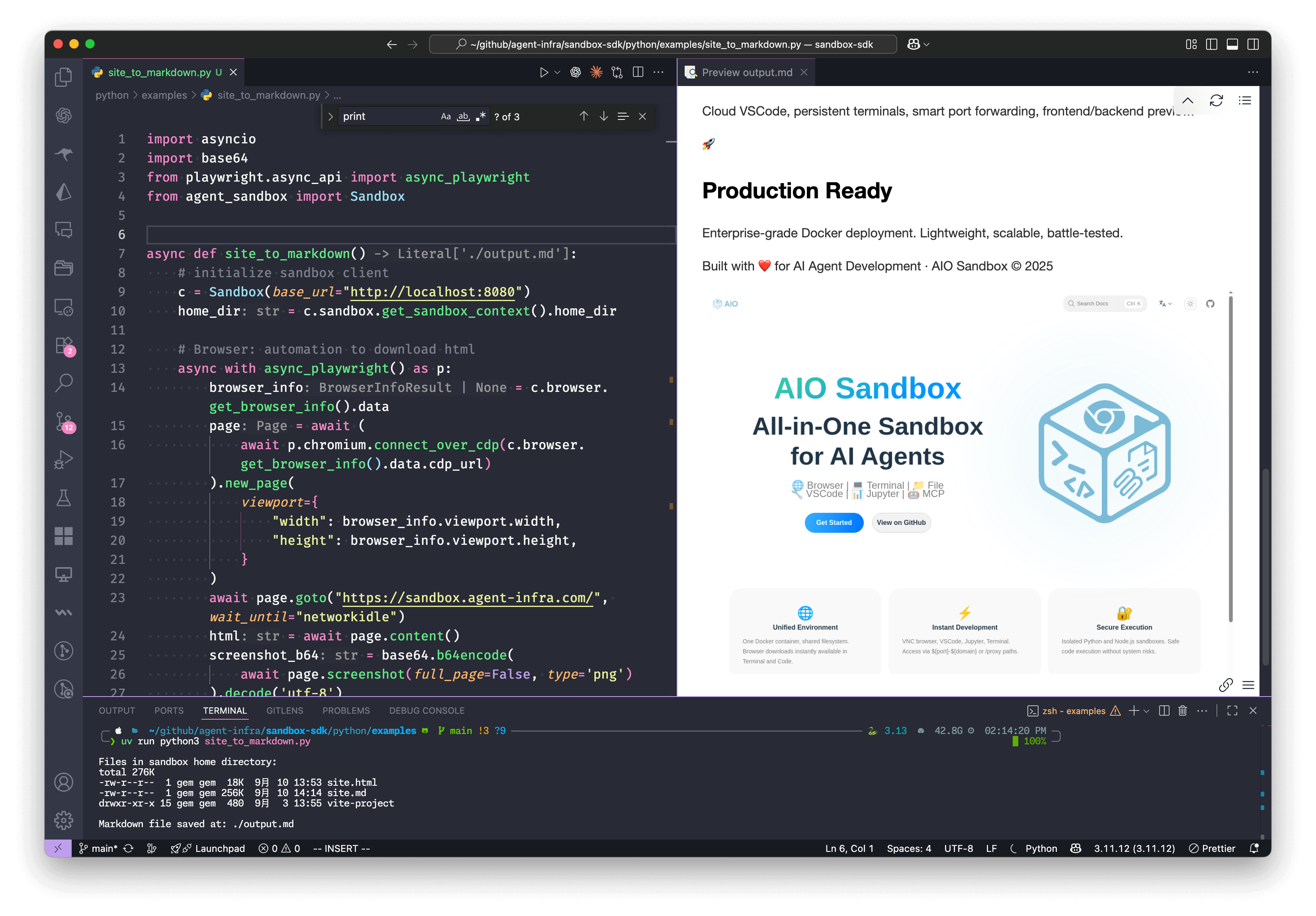
import asyncio
import base64
from playwright.async_api import async_playwright
from agent_sandbox import Sandbox
async def site_to_markdown():
# initialize sandbox client
c = Sandbox(base_url="http://localhost:8080")
home_dir = c.sandbox.get_context().home_dir
# Browser: automation to download html
async with async_playwright() as p:
browser_info = c.browser.get_info().data
page = await (await p.chromium.connect_over_cdp(browser_info.cdp_url)).new_page(
viewport={
"width": browser_info.viewport.width,
"height": browser_info.viewport.height,
}
)
await page.goto("https://sandbox.agent-infra.com/", wait_until="networkidle")
html = await page.content()
screenshot_b64 = base64.b64encode(
await page.screenshot(full_page=False, type='png')
).decode('utf-8')
# Jupyter: Run code in sandbox to convert html to markdown
c.jupyter.execute_code(
code=f"""
from markdownify import markdownify
html = '''{html}'''
screenshot_b64 = "{screenshot_b64}"
md = f"{{markdownify(html)}}\\n\\n"
with open('{home_dir}/site.md', 'w') as f:
f.write(md)
print("Done!")
"""
)
# BasH: execute command to list files in sandbox
list_result = c.shell.exec_command(command=f"ls -lh {home_dir}")
print(f"\nFiles in sandbox home directory:\n{list_result.data.output}")
open("./output.md", "w").write(
c.file.read_file(file=f"{home_dir}/site.md").data.content
)
return "./output.md"
if __name__ == "__main__":
# Run the async function
result = asyncio.run(site_to_markdown())
print(f"\nMarkdown file saved at: {result}")
Access Points
Once running, you can access different interfaces:
Getting Help
Ready to build something awesome? Let's dive deeper into the specific components!
