Code Execution
Agent Sandbox provides powerful code execution capabilities for Python and JavaScript/Node.js, enabling you to run code in isolated environments with full control over execution and session management.
This page is kept as an overview. For the current split guides, see Unified Code Execution, Jupyter, and Node.js.
Overview
The sandbox offers two main execution environments:
- Jupyter Kernel: For Python code execution with persistent sessions and variable state
- Node.js Runtime: For JavaScript code execution in fresh, isolated environments
Both environments support timeout control, output streaming, and comprehensive error handling.
Python Execution (Jupyter)
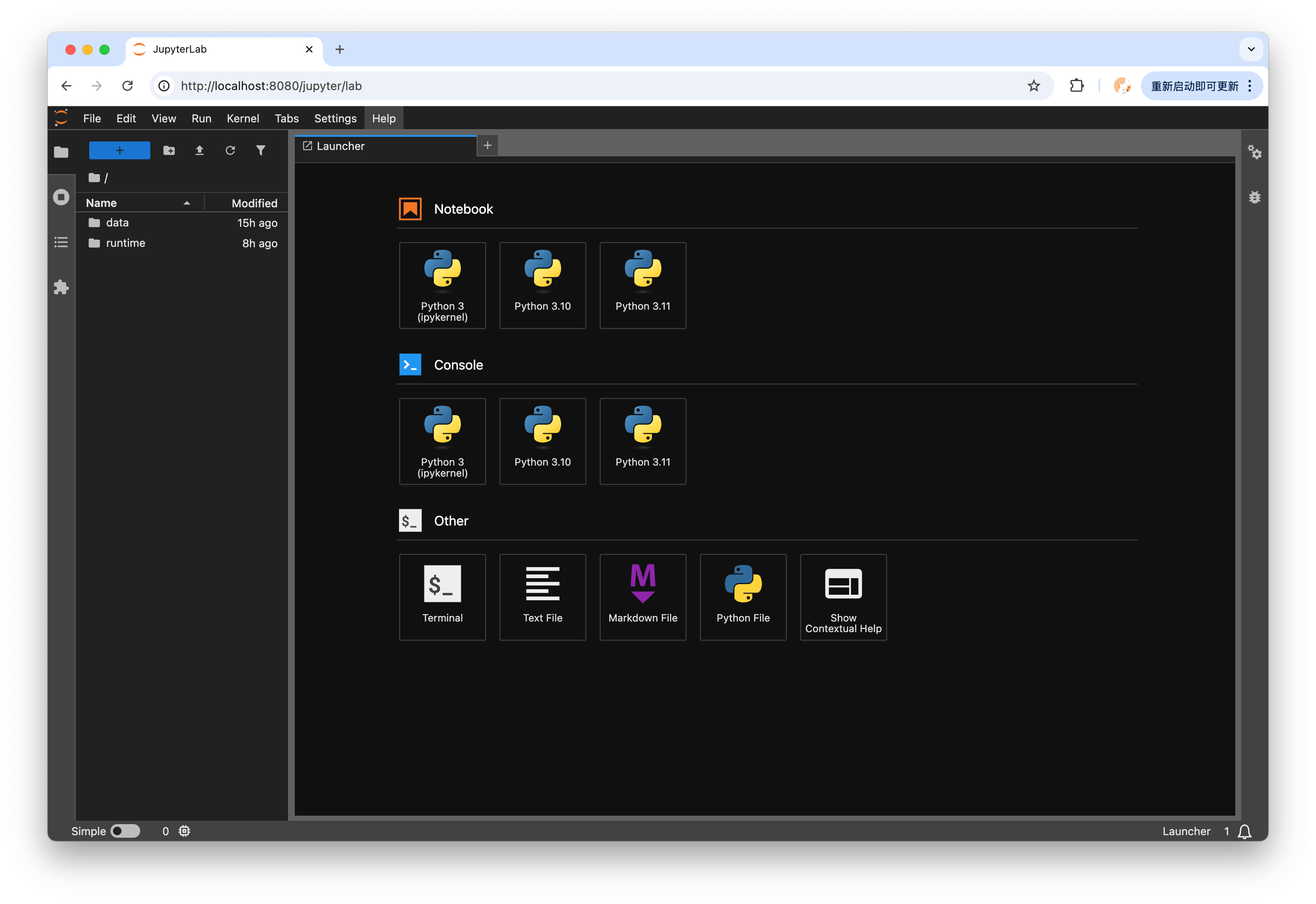
The sandbox integrates with JupyterLab to provide a powerful Python execution environment. JupyterLab offers an interactive computing platform with support for notebooks, code execution, and rich output visualization.
Features
- Interactive Development: Execute Python code with immediate feedback
- Rich Output Support: Display plots, tables, HTML, and multimedia content
- Session Persistence: Maintain variable state across multiple executions
- Multiple Kernels: Support for Python 3.10, 3.11, and 3.12 kernels
- Notebook Compatibility: Full compatibility with Jupyter notebook format
Basic Execution
Execute Python code using the Jupyter kernel with automatic session management:
from agent_sandbox import Sandbox

client = Sandbox(base_url="http://127.0.0.1:8080")

# Execute Python code
result = client.jupyter.execute_code(
    code="""
import numpy as np

data = np.random.randn(10, 5)
mean = np.mean(data, axis=0)
print(f"Shape: {data.shape}")
print(f"Mean values: {mean}")
data.sum()
"""
)

print(f"Status: {result.status}")
print(f"Outputs: {result.outputs}")
curl -X POST "http://127.0.0.1:8080/v1/jupyter/execute" \
  -H "Content-Type: application/json" \
  -d '{
    "code": "import numpy as np\ndata = np.random.randn(10, 5)\nprint(data.shape)"
  }'
Session Management
Maintain variable state across multiple code executions using sessions:
# First execution - initialize variables
result1 = client.jupyter.execute_code(
    code="x = 42\ny = 'Hello'",
    session_id="my_session"
)

# Second execution - use previous variables
result2 = client.jupyter.execute_code(
    code="print(f'{y}, the answer is {x}')",
    session_id="my_session"  # Same session ID
)

# List active sessions
sessions = client.jupyter.list_sessions()
print(f"Active sessions: {sessions.sessions}")

# Clean up specific session
client.jupyter.cleanup_session(session_id="my_session")
# First execution - initialize variables
curl -X POST "http://127.0.0.1:8080/v1/jupyter/execute" \
  -H "Content-Type: application/json" \
  -d '{
    "code": "x = 42\ny = \"Hello\"",
    "session_id": "my_session"
  }'

# Second execution - use previous variables
curl -X POST "http://127.0.0.1:8080/v1/jupyter/execute" \
  -H "Content-Type: application/json" \
  -d '{
    "code": "print(f\"{y}, the answer is {x}\")",
    "session_id": "my_session"
  }'

# List active sessions
curl -X GET "http://127.0.0.1:8080/v1/jupyter/sessions"

# Clean up specific session
curl -X DELETE "http://127.0.0.1:8080/v1/jupyter/sessions/my_session"
Multi-Version Python Support
The sandbox supports multiple Python versions through different Jupyter kernels:
# Check available Python versions
info = client.jupyter.info()
print(f"Available kernels: {info.available_kernels}")
# Output: ['python3', 'python3.10', 'python3.11', 'python3.12']

# Use Python 3.10
result_py310 = client.jupyter.execute_code(
    code="""
import sys
print(f"Python: {sys.version}")
def process(items: list[str]) -> None:
    for item in items:
        print(item)
process(['a', 'b', 'c'])
""",
    kernel_name="python3.10"
)

# Use Python 3.11 for new features
result_py311 = client.jupyter.execute_code(
    code="""
import sys
print(f"Python: {sys.version}")
# Use Python 3.11+ features
def process(items: list[str]) -> None:  # New syntax
    match items:  # Structural pattern matching
        case []:
            print("Empty")
        case [single]:
            print(f"One item: {single}")
        case _:
            print(f"Multiple items: {items}")
process(['hello', 'world'])
""",
    kernel_name="python3.11"
)

# Use Python 3.12 for latest features
result_py312 = client.jupyter.execute_code(
    code="""
import sys
print(f"Python: {sys.version}")
# Use Python 3.12+ features
type Point = tuple[float, float]  # Type alias syntax
def distance(p1: Point, p2: Point) -> float:
    return ((p1[0] - p2[0])**2 + (p1[1] - p2[1])**2)**0.5
print(distance((0, 0), (3, 4)))
""",
    kernel_name="python3.12"
)
# List available kernels
curl -X GET "http://127.0.0.1:8080/v1/jupyter/info"

# Execute with specific kernel
curl -X POST "http://127.0.0.1:8080/v1/jupyter/execute" \
  -H "Content-Type: application/json" \
  -d '{
    "code": "print(__import__(\"sys\").version)",
    "kernel_name": "python3.11"
  }'
Advanced Options
Configure kernel, timeout, and other execution parameters:
# Use specific kernel with timeout
result = client.jupyter.execute_code(
    code="""
import time
import sys

print(f"Python version: {sys.version}")
time.sleep(2)
print("Processing complete")
""",
    kernel_name="python3.11",  # Specific kernel version
    timeout=30,  # 30 second timeout
)

# Get Jupyter environment info
info = client.jupyter.info()
print(f"Available kernels: {info.available_kernels}")
print(f"Default kernel: {info.default_kernel}")
print(f"Session timeout: {info.session_timeout_seconds}s")
print(f"Max sessions: {info.max_sessions}")
Output Types
Jupyter execution returns different output types based on the code:
result = client.jupyter.execute_code(code="...")

# Check execution status
print(f"Status: {result.status}")  # 'ok', 'error', or 'timeout'
print(f"Execution count: {result.execution_count}")

# Process outputs
for output in result.outputs:
    if output.output_type == "stream":
        # Standard output/error
        print(f"{output.name}: {output.text}")
    elif output.output_type == "execute_result":
        # Return value
        print(f"Result: {output.data}")
    elif output.output_type == "display_data":
        # Rich display (plots, HTML, etc.)
        print(f"Display: {output.data}")
    elif output.output_type == "error":
        # Error traceback
        print(f"Error: {output.ename}: {output.evalue}")
        for line in output.traceback:
            print(line)
JavaScript/Node.js Execution
Basic Execution
Execute JavaScript code in an isolated Node.js environment:
# Execute JavaScript code
result = client.nodejs.execute_nodejs_code(
    code="""
const fs = require('fs');
const crypto = require('crypto');

// Generate random hash
const hash = crypto.randomBytes(16).toString('hex');
console.log(`Generated hash: ${hash}`);

// Return a value
const result = {
    timestamp: new Date().toISOString(),
    hash: hash,
    nodeVersion: process.version
};
console.log(JSON.stringify(result, null, 2));
"""
)

print(f"Status: {result.status}")
print(f"Output: {result.stdout}")
print(f"Exit code: {result.exit_code}")
// Execute JavaScript code
const result = await client.nodejs.executeNodejsCode({
  code: `
const fs = require('fs');
const crypto = require('crypto');

// Generate random hash
const hash = crypto.randomBytes(16).toString('hex');
console.log(\`Generated hash: \${hash}\`);

// Return a value
const result = {
    timestamp: new Date().toISOString(),
    hash: hash,
    nodeVersion: process.version
};
console.log(JSON.stringify(result, null, 2));
`
});

console.log(`Status: ${result.status}`);
console.log(`Output: ${result.stdout}`);
console.log(`Exit code: ${result.exitCode}`);
curl -X POST "http://127.0.0.1:8080/v1/nodejs/execute" \
  -H "Content-Type: application/json" \
  -d '{
    "code": "console.log(\"Hello from Node.js!\"); console.log(process.version);"
  }'
Working with Files
Create additional files in the execution environment:
# Execute with additional files
result = client.nodejs.execute_nodejs_code(
    code="""
const fs = require('fs');

// Read the config file we created
const config = JSON.parse(fs.readFileSync('config.json', 'utf8'));
console.log('Config loaded:', config);

// Read the data file
const data = fs.readFileSync('data.txt', 'utf8');
console.log('Data:', data);

// Process and output
console.log(`Processing ${config.name} with ${data.split('\\n').length} lines`);
""",
    files={
        "config.json": '{"name": "test", "version": "1.0.0"}',
        "data.txt": "line1\\nline2\\nline3"
    }
)
// Execute with additional files
const result = await client.nodejs.executeNodejsCode({
  code: `
const fs = require('fs');

// Read the config file we created
const config = JSON.parse(fs.readFileSync('config.json', 'utf8'));
console.log('Config loaded:', config);

// Read the data file
const data = fs.readFileSync('data.txt', 'utf8');
console.log('Data:', data);

// Process and output
console.log(\`Processing \${config.name} with \${data.split('\\n').length} lines\`);
`,
  files: {
    "config.json": '{"name": "test", "version": "1.0.0"}',
    "data.txt": "line1\\nline2\\nline3"
  }
});
Provide input to the Node.js process:
# Interactive script with stdin
result = client.nodejs.execute_nodejs_code(
    code="""
const readline = require('readline');

const rl = readline.createInterface({
    input: process.stdin,
    output: process.stdout
});

let lines = [];
rl.on('line', (line) => {
    lines.push(line);
});

rl.on('close', () => {
    console.log('Received lines:', lines.length);
    lines.forEach((line, i) => {
        console.log(`Line ${i + 1}: ${line}`);
    });
});
""",
    stdin="Hello\\nWorld\\nFrom stdin",
    timeout=5
)
// Interactive script with stdin
const result = await client.nodejs.executeNodejsCode({
  code: `
const readline = require('readline');

const rl = readline.createInterface({
    input: process.stdin,
    output: process.stdout
});

let lines = [];
rl.on('line', (line) => {
    lines.push(line);
});

rl.on('close', () => {
    console.log('Received lines:', lines.length);
    lines.forEach((line, i) => {
        console.log(\`Line \${i + 1}: \${line}\`);
    });
});
`,
  stdin: "Hello\\nWorld\\nFrom stdin",
  timeout: 5
});
Get information about the Node.js environment:
# Get Node.js runtime info
info = client.nodejs.info()

print(f"Node version: {info.node_version}")
print(f"npm version: {info.npm_version}")
print(f"Supported languages: {info.supported_languages}")
print(f"Runtime directory: {info.runtime_directory}")
// Get Node.js runtime info
const info = await client.nodejs.info();

console.log(`Node version: ${info.nodeVersion}`);
console.log(`npm version: ${info.npmVersion}`);
console.log(`Supported languages: ${info.supportedLanguages}`);
console.log(`Runtime directory: ${info.runtimeDirectory}`);
Error Handling
Both execution environments provide comprehensive error information:
Python Errors
try:
    result = client.jupyter.execute_code(
        code="print(undefined_variable)"
    )

    if result.status == "error":
        for output in result.outputs:
            if output.output_type == "error":
                print(f"Error: {output.ename}")
                print(f"Message: {output.evalue}")
                print("Traceback:")
                for line in output.traceback:
                    print(line)
except Exception as e:
    print(f"Execution failed: {e}")
JavaScript Errors
result = client.nodejs.execute_nodejs_code(
    code="throw new Error('Something went wrong');"
)

if result.status == "error":
    print(f"Error output: {result.stderr}")
    print(f"Exit code: {result.exit_code}")

    # Check outputs for error details
    for output in result.outputs:
        if output.output_type == "error":
            print(f"Error: {output.ename}: {output.evalue}")
Best Practices
1. Session Management
- Use sessions for related computations that share state
- Clean up sessions when done to free resources
- Sessions auto-expire after 30 minutes of inactivity
2. Timeout Configuration
- Set appropriate timeouts for long-running operations
- Default timeout is 30 seconds, maximum is 300 seconds
- Consider breaking very long computations into smaller chunks
3. Resource Usage
- Be mindful of memory usage in persistent sessions
- Node.js environments are fresh for each execution
- Clean up large variables in Jupyter sessions when not needed
4. Error Recovery
# Robust execution with error handling
def execute_with_retry(code, max_retries=3):
    for attempt in range(max_retries):
        try:
            result = client.jupyter.execute_code(
                code=code,
                timeout=60
            )

            if result.status == "ok":
                return result
            elif result.status == "timeout":
                print(f"Timeout on attempt {attempt + 1}")
                continue
            else:
                # Handle error
                print(f"Error on attempt {attempt + 1}")
                break
        except Exception as e:
            print(f"Exception on attempt {attempt + 1}: {e}")
            if attempt == max_retries - 1:
                raise

    return None
5. Output Processing
def process_outputs(result):
    """Extract and organize different output types"""
    stdout = []
    stderr = []
    results = []
    errors = []

    for output in result.outputs:
        if output.output_type == "stream":
            if output.name == "stdout":
                stdout.append(output.text)
            elif output.name == "stderr":
                stderr.append(output.text)
        elif output.output_type == "execute_result":
            results.append(output.data)
        elif output.output_type == "error":
            errors.append({
                "name": output.ename,
                "value": output.evalue,
                "traceback": output.traceback
            })

    return {
        "stdout": "".join(stdout),
        "stderr": "".join(stderr),
        "results": results,
        "errors": errors
    }
API Reference
Jupyter Endpoints
Node.js Endpoints
Response Models
JupyterExecuteResponse
interface JupyterExecuteResponse {
  kernel_name: string;      // Kernel used for execution
  session_id: string;        // Session identifier
  status: string;            // 'ok', 'error', or 'timeout'
  execution_count?: number;  // Execution counter
  outputs: JupyterOutput[];  // Execution outputs
  code: string;              // Executed code
  msg_id?: string;           // Message ID
}
NodeJSExecuteResponse
interface NodeJSExecuteResponse {
  language: string;          // Always 'javascript'
  status: string;            // 'ok', 'error', or 'timeout'
  execution_count?: number;  // Execution counter
  outputs: NodeJSOutput[];   // Execution outputs
  code: string;              // Executed code
  stdout: string;            // Standard output
  stderr: string;            // Standard error
  exit_code: number;         // Process exit code
}
Next Steps
